
Authorize
Use this API to authenticate with the Cashfree system and obtain the authorization bearer token. All other API calls must have this token as Authorization header in the format 'Bearer <token>' (without quotes) for them to get processed.
POST
Authorize
URLs
- Production/Live: https://payout-api.cashfree.com/payout/v1/authorize
- Sandbox/Test: https://payout-gamma.cashfree.com/payout/v1/authorize
Click to view the steps to generate a public key and the signature.
Click to view the steps to generate a public key and the signature.
If you do not have a static IP, you can generate a public key and pass it with the API request.
To generate a public key,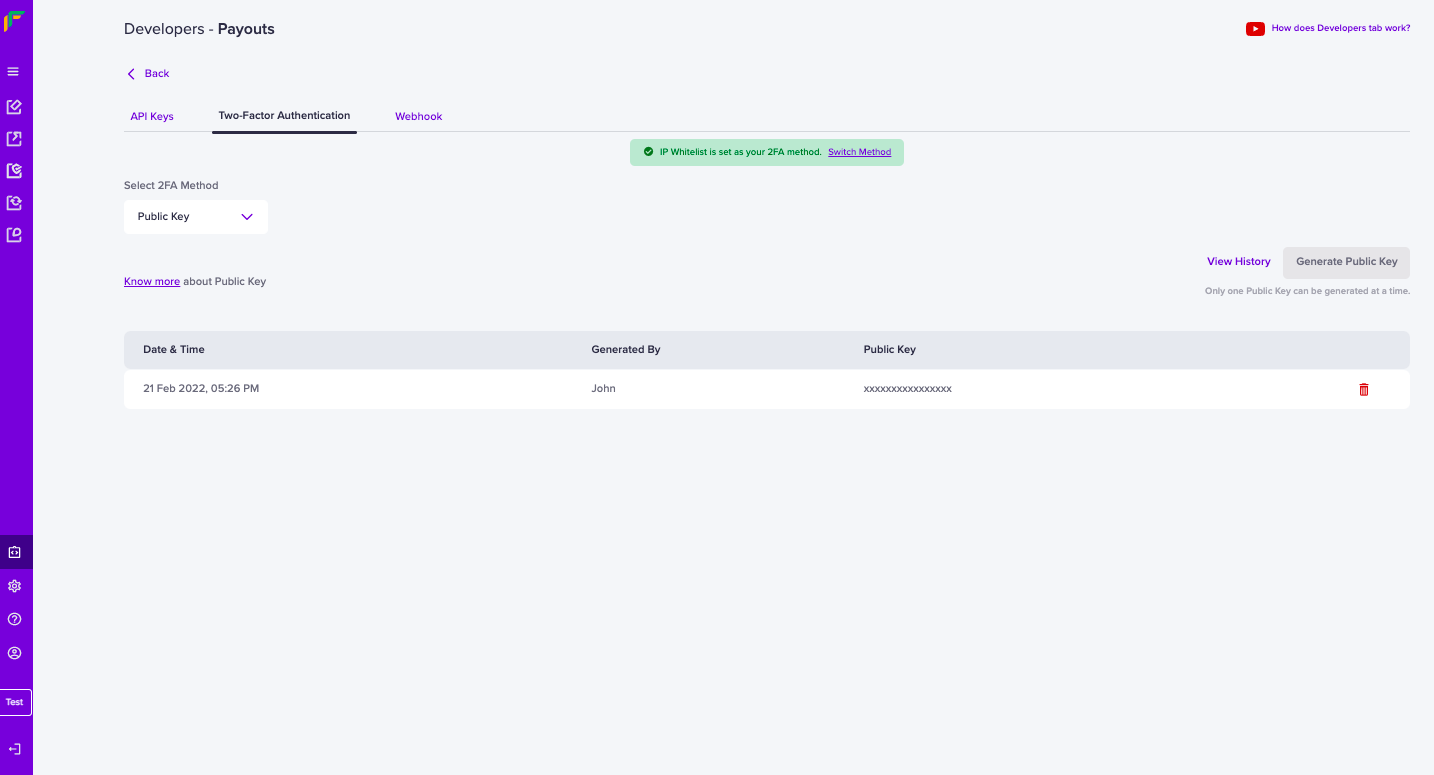 Below are the steps to generate your signature:
- Go Payouts Dashboard > Developers section on the left-side navigation > Payouts > Two-Factor Authentication > Public Key.
- Click Generate Public Key. The public key will be downloaded to your computer and the password to access it will be your email ID registered with Telr. Only one Public Key can be generated at a time.
Below are the steps to generate your signature:- Retrieve your clientId (one which you are passing through the header X-Client-Id )
- Append this with CURRENT UNIX timestamp separated by a period (.)
- Encrypt this data using RSA encrypt with Public key you received - this is the signature.
- Pass this signature through the header X-Cf-Signature. In the case of using our library, go through the libraries section. During the initialization process, you need to pass the key as a parameter.