> ## Documentation Index
> Fetch the complete documentation index at: https://telr-docs.cashfree.com/llms.txt
> Use this file to discover all available pages before exploring further.
# Verify PAN (Standard and OCR)
PAN Verification feature enables you to instantly verify PAN details of individuals or businesses before you onboard them or make any transactions with them. The feature helps you to validate if a particular PAN is valid, also check if it belongs to an individual or a business. You can verify the PAN information using the dashboard or via APIs.
> 👍 Verify PAN for Free!
>
> You can verify your beneficiary PAN details for free using Free Credits. With this limited-time offer, experience and test the feature without paying any verification charges.
>
> A banner displays the offer for you on the **Verification Suite - PAN** page (Verification Suite Dashboard > Verification Suite - PAN). Click **Claim Free Credits** and instantly redeem the credits to your account.
You can use the PAN verification feature for various purposes, such as:
* Onboarding vendors
* Onboarding employees
* Transferring funds or processing payments
* Required for KYC verification
You can do a single verification or a bulk verification of up to 10,000 PANs at a time via API. View details like PAN type, name of the PAN holder, verification status, and more, of all PAN numbers shared in the file. Currently, we support verification of PAN via APIs only.
***
## Use Cases
**Loan Providers**\
Loan providers can verify their customers PAN instantly as part of KYC verification before disbursing the amount. This will help them to check the authenticity of the customers.
**Insurance and Investment Portals**\
Insurance and investment portals can verify customers PAN instantly as part of KYC verification during onboarding. This will ensure successful payouts later.
**Wallets**\
Wallets like Paytm, Amazon Pay, etc., can verify customers PAN during onboarding or for KYC requirements. This will help to process successful refunds to their wallets or accept wallet payments.
**Payments or Fintech Industry**\
Payments or fintech industries can use the PAN verification feature to instantly verify PAN that belongs to a business or an individual before transferring funds or processing any payments.
***
## Supported PAN Types
| Initials | Type | Category |
| :------- | :------------- | :--------------------- |
| P | Individual PAN | Individual |
| C | Business PAN | Company |
| F | Business PAN | Firm |
| T | Business PAN | Trust |
| L | Business PAN | Local Authority |
| H | Business PAN | Hindu Unified Family |
| A | Business PAN | Association of Persons |
| B | Business PAN | Body of Individuals |
***
## Verify PAN
To verify PAN,
1. Go to **Verification Suite Dashboard** > **PAN** > click **Verify PAN**.
2. Enter the **PAN** and **Name** you want to verify.
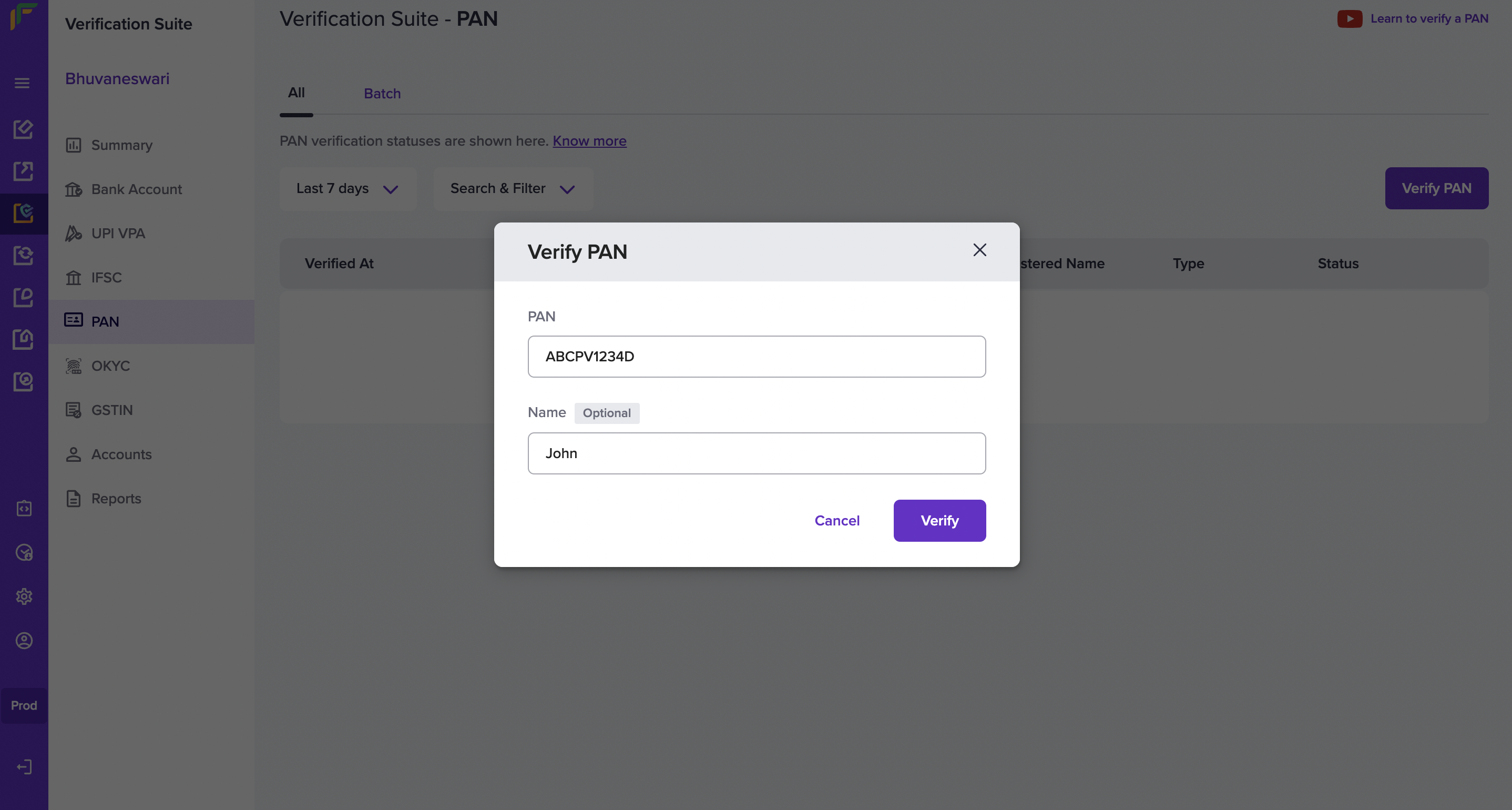 3. Click **Verify**. You will see a success message if the PAN exists.
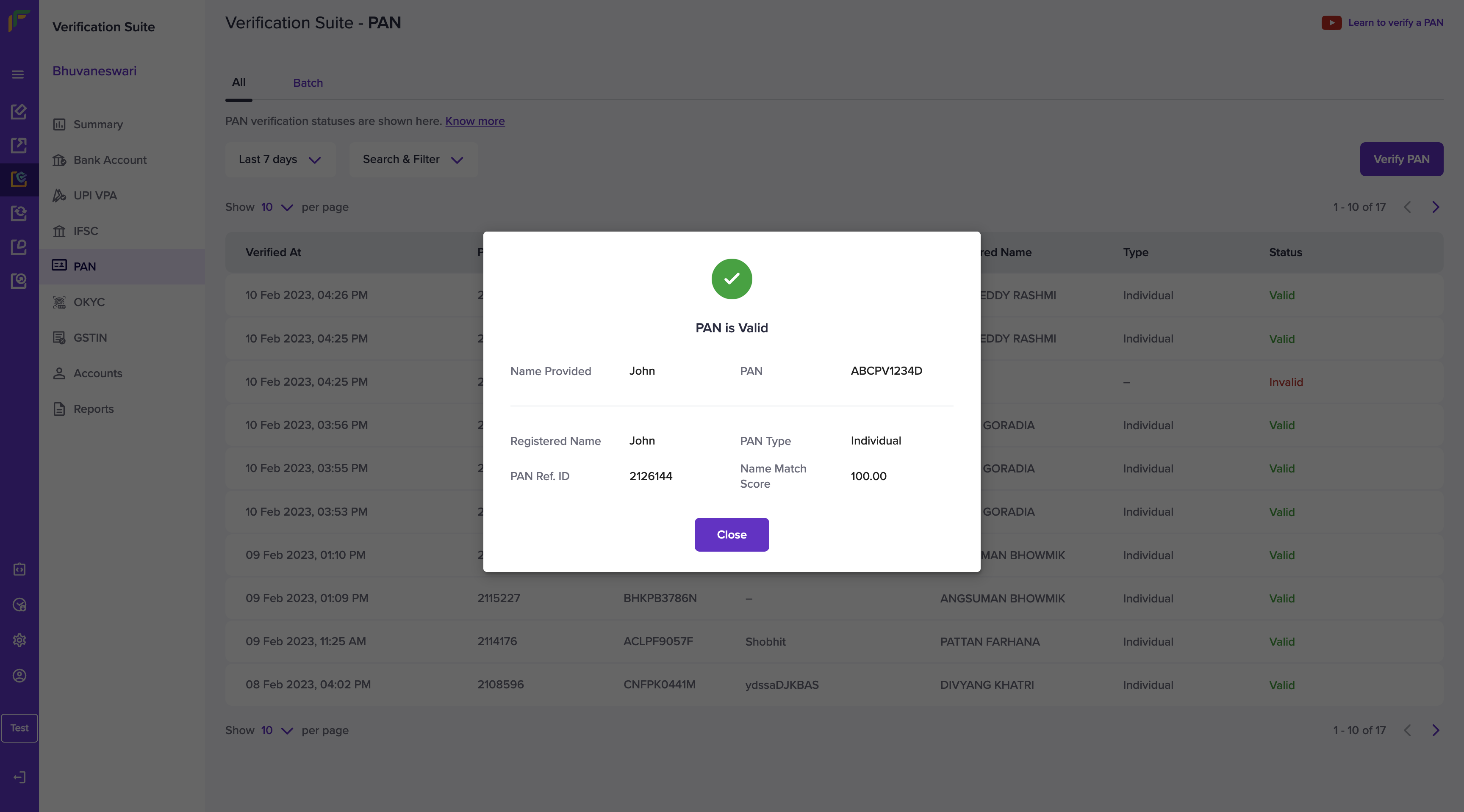 All PAN's that you verify will be visible and available for your reference in the Verification Suite - PAN screen. You can search and filter for the details based on the status (Valid, Invalid, Rejected, Verification Failed), specific time duration, and PAN type.
> 📘 You can also use our API to [verify PAN](/api-reference/vrs/v2/pan/verify-pan-sync) details.
***
## Verify PAN in Batch
When you have a large number of PAN to be verified, you can upload a single file with all the details to verify them in one go.
To verify all the PAN, you must upload a .csv, .xls, or a .xlsx file that contains the PAN and name of an individual or business you want to verify. Download the sample file to know how the details must be filled in the file.
To upload a batch file with PAN details,
1. Go to **Verification Suite Dashboard** > **Batch** > click **Upload File**.
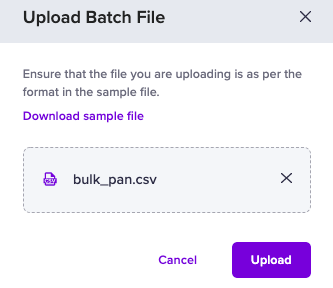
2. Click **Choose a File** to select the file you want to upload and click **Upload**. The uploaded file will be visible in the **Batch** section.
All PAN's that you verify will be visible and available for your reference in the Verification Suite - PAN screen. You can search and filter for the details based on the status (Valid, Invalid, Rejected, Verification Failed), specific time duration, and PAN type.
> 📘 You can also use our API to [verify PAN](/api-reference/vrs/v2/pan/verify-pan-sync) details.
***
## Verify PAN in Batch
When you have a large number of PAN to be verified, you can upload a single file with all the details to verify them in one go.
To verify all the PAN, you must upload a .csv, .xls, or a .xlsx file that contains the PAN and name of an individual or business you want to verify. Download the sample file to know how the details must be filled in the file.
To upload a batch file with PAN details,
1. Go to **Verification Suite Dashboard** > **Batch** > click **Upload File**.
2. Click **Choose a File** to select the file you want to upload and click **Upload**. The uploaded file will be visible in the **Batch** section.
 3. Click the uploaded file to view the status of the PAN details uploaded in the file.
All PAN's you verify will be visible and available for your reference in the Verification Suite - PAN screen. You can search by file name and filter for the details based on the status (Processed, Rejected, Processing, Cancelled) or a specific time duration.
> 📘 You can also use our API to [verify PAN](/api-reference/vrs/v2/pan/verify-pan-sync) details in batch.
## Verify PAN via OCR
You can verify the PAN information of your customers using optical character recognition(OCR) with Telr and save your time. This technology recognises the text in an image or a scanned document and converts the text in the image to machine readable text format.
Improve the customer onboarding process by eliminating the tedious manual process of document verification.\
Without human intervention, the accuracy of identifying and verifying the documents is higher.
You can use our [PAN Verification via BhartOCR API](/api-reference/vrs/v2/bharat-ocr/bharat-ocr)
## Name Match Score
To manually check if the provided customer name and the name registered at the bank are the same, consumes a lot of time and effort. Telr has introduced a new feature that will help you to verify if the names are the same and provide the result accordingly.
Two new parameters, **nameMatchResult** and **nameMatchScore** will be available in the response, which will help you make faster validations and process payments successfully.
Contact your Account Manager or Fill out the [Support Form](https://telr.cashfree.com/merchants/landing?env=prod\&raise_issue=1) to activate the name match score feature for your account.
**Examples**:
**Direct Match**
| Name 1 | Name 2 | nameMatchResult | nameMatchScore |
| :------------------ | :------------------ | :-------------- | :------------- |
| Rohan Mathew Thomas | Rohan Mathew Thomas | Direct match | 100.00 |
These names are exactly the same, so we get a perfect score.
***
**Good Partial Match**
| Name 1 | Name 2 | nameMatchResult | nameMatchScore |
| :------------------ | :----------- | :----------------- | :------------- |
| Rohan Mathew Thomas | Rohan Thomas | Good partial match | 85.00 |
The name Mathew is missing in the above example, but the rest of the names match perfectly. So we are mostly sure it is the same person.
***
**Moderate Partial Match**
| Name 1 | Name 2 | nameMatchResult | nameMatchScore |
| :------------------ | :------------ | :--------------------- | :------------- |
| Rohan Mathew Thomas | Roshan Thomas | Moderate partial match | 61.00 |
In the above example, name **Thomas** matches both names and **han** matches both names, which increases the score, but overall a moderate partial match.
***
**Poor Partial Match**
| Name 1 | Name 2 | nameMatchResult | nameMatchScore |
| :------------------ | :------------- | :----------------- | :------------- |
| Rohan Mathew Thomas | Rohan Mathew K | Poor partial match | 55.00 |
In the above example, although the two names are the same, the initial K is completely different which means that it could be a different person. The namematchscore is low.
***
**No Match**
| Name 1 | Name 2 | nameMatchResult | nameMatchScore |
| :------------------ | :----- | :-------------- | :------------- |
| Rohan Mathew Thomas | Rajeev | No match | 14.00 |
***
**Score Categorization**
| Match Result | Match Score Range |
| :--------------------- | :---------------- |
| Direct Match | 100.00 |
| Good Partial Match | 85.00 - 99.00 |
| Moderate Partial Match | 60.00 - 84.00 |
| Poor Partial Match | 34.00 - 59.00 |
| No Match | 0 - 33.00 |
3. Click the uploaded file to view the status of the PAN details uploaded in the file.
All PAN's you verify will be visible and available for your reference in the Verification Suite - PAN screen. You can search by file name and filter for the details based on the status (Processed, Rejected, Processing, Cancelled) or a specific time duration.
> 📘 You can also use our API to [verify PAN](/api-reference/vrs/v2/pan/verify-pan-sync) details in batch.
## Verify PAN via OCR
You can verify the PAN information of your customers using optical character recognition(OCR) with Telr and save your time. This technology recognises the text in an image or a scanned document and converts the text in the image to machine readable text format.
Improve the customer onboarding process by eliminating the tedious manual process of document verification.\
Without human intervention, the accuracy of identifying and verifying the documents is higher.
You can use our [PAN Verification via BhartOCR API](/api-reference/vrs/v2/bharat-ocr/bharat-ocr)
## Name Match Score
To manually check if the provided customer name and the name registered at the bank are the same, consumes a lot of time and effort. Telr has introduced a new feature that will help you to verify if the names are the same and provide the result accordingly.
Two new parameters, **nameMatchResult** and **nameMatchScore** will be available in the response, which will help you make faster validations and process payments successfully.
Contact your Account Manager or Fill out the [Support Form](https://telr.cashfree.com/merchants/landing?env=prod\&raise_issue=1) to activate the name match score feature for your account.
**Examples**:
**Direct Match**
| Name 1 | Name 2 | nameMatchResult | nameMatchScore |
| :------------------ | :------------------ | :-------------- | :------------- |
| Rohan Mathew Thomas | Rohan Mathew Thomas | Direct match | 100.00 |
These names are exactly the same, so we get a perfect score.
***
**Good Partial Match**
| Name 1 | Name 2 | nameMatchResult | nameMatchScore |
| :------------------ | :----------- | :----------------- | :------------- |
| Rohan Mathew Thomas | Rohan Thomas | Good partial match | 85.00 |
The name Mathew is missing in the above example, but the rest of the names match perfectly. So we are mostly sure it is the same person.
***
**Moderate Partial Match**
| Name 1 | Name 2 | nameMatchResult | nameMatchScore |
| :------------------ | :------------ | :--------------------- | :------------- |
| Rohan Mathew Thomas | Roshan Thomas | Moderate partial match | 61.00 |
In the above example, name **Thomas** matches both names and **han** matches both names, which increases the score, but overall a moderate partial match.
***
**Poor Partial Match**
| Name 1 | Name 2 | nameMatchResult | nameMatchScore |
| :------------------ | :------------- | :----------------- | :------------- |
| Rohan Mathew Thomas | Rohan Mathew K | Poor partial match | 55.00 |
In the above example, although the two names are the same, the initial K is completely different which means that it could be a different person. The namematchscore is low.
***
**No Match**
| Name 1 | Name 2 | nameMatchResult | nameMatchScore |
| :------------------ | :----- | :-------------- | :------------- |
| Rohan Mathew Thomas | Rajeev | No match | 14.00 |
***
**Score Categorization**
| Match Result | Match Score Range |
| :--------------------- | :---------------- |
| Direct Match | 100.00 |
| Good Partial Match | 85.00 - 99.00 |
| Moderate Partial Match | 60.00 - 84.00 |
| Poor Partial Match | 34.00 - 59.00 |
| No Match | 0 - 33.00 |