> ## Documentation Index
> Fetch the complete documentation index at: https://telr-docs.cashfree.com/llms.txt
> Use this file to discover all available pages before exploring further.
# Vendor Dashboard
> Overview of the vendor dashboard, including transactions, settlements, and reports.
The **Vendor Dashboard** is a dedicated dashboard for vendors to view their transactions, settlements, and reports. Vendors receive an invitation and can access the dashboard only after you grant them access.
 ## Accessing the vendor dashboard
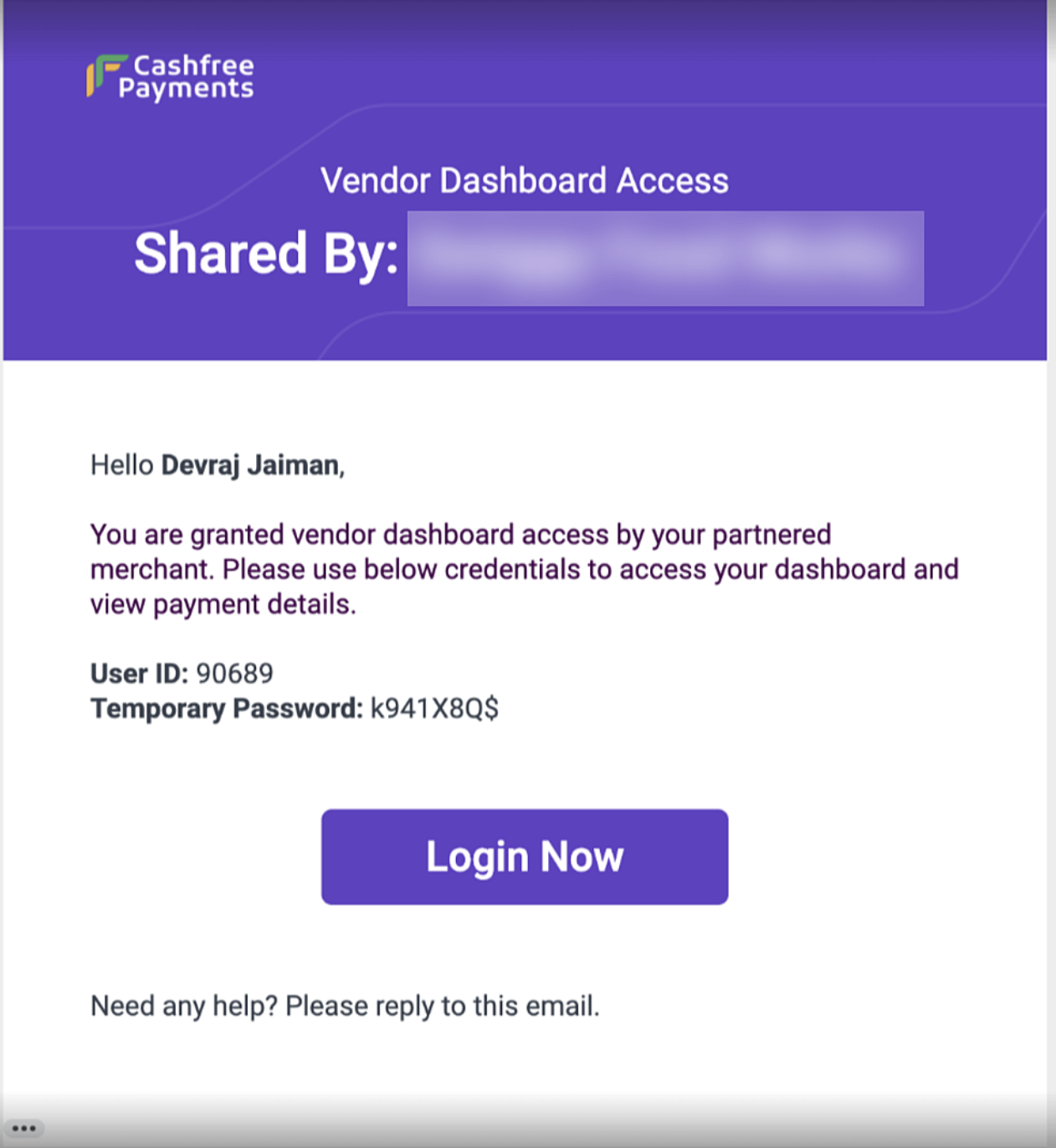
Below are the steps to access the vendor dashboard for the first time:
1. Activate the vendor dashboard feature by requesting your account manager.
2. Grant access to the required vendor through the **[merchant dashboard](https://telr.cashfree.com/merchants)** or APIs.
3. An automated email is sent to the vendor’s registered email ID.
4. The vendor can reset their password and log in using the new credentials.
## Summary
Once the vendor logs in to the vendor dashboard, they can view the **Summary** tab. This tab displays:
* Recent settlements
* Upcoming settlements
* Total transactions
* Total refunds
## Accessing the vendor dashboard
Below are the steps to access the vendor dashboard for the first time:
1. Activate the vendor dashboard feature by requesting your account manager.
2. Grant access to the required vendor through the **[merchant dashboard](https://telr.cashfree.com/merchants)** or APIs.
3. An automated email is sent to the vendor’s registered email ID.
4. The vendor can reset their password and log in using the new credentials.
## Summary
Once the vendor logs in to the vendor dashboard, they can view the **Summary** tab. This tab displays:
* Recent settlements
* Upcoming settlements
* Total transactions
* Total refunds
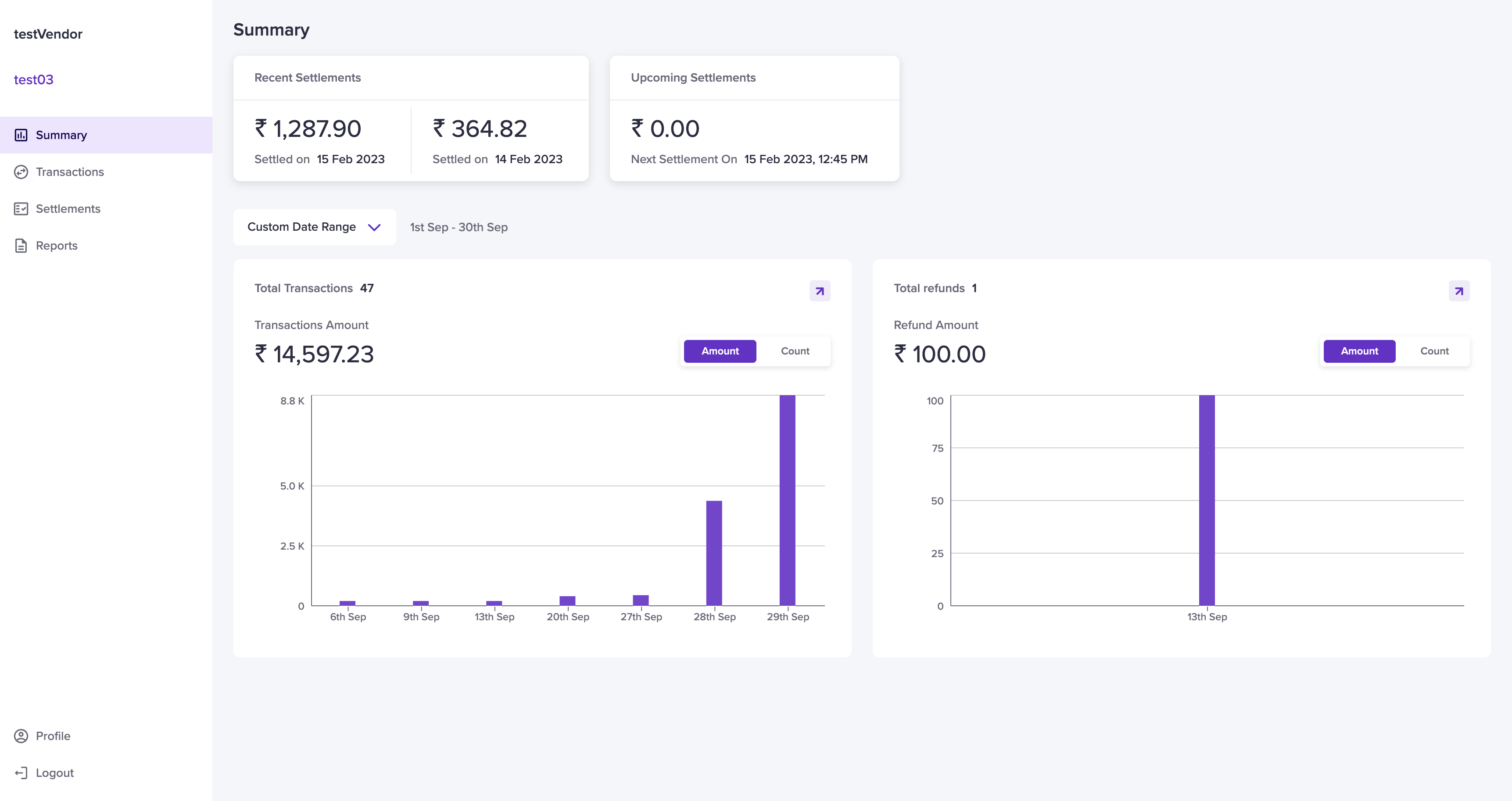 Select a date range from the drop-down menu. If you select **Custom Date Range**, specify the date range and click **Apply**. The transactions and refunds will be displayed based on the selected period.
### Total Transactions
The **Total Transactions** section displays:
* The transaction count
* The total transaction amount for the selected period
Hover over the dates to view individual transaction amounts. Clicking the **arrow icon** redirects vendors to the **Transactions** page.
### Total Refunds
The **Total Refunds** section displays:
* The refund count
* The total refund amount for the selected period
Hover over the dates to view individual refund amounts. Clicking the **arrow icon** redirects vendors to the **Refunds** page.
## Profile
The **Profile** section displays vendor details.
To access it, navigate to **Vendor Dashboard** > **Profile**.
The **Profile** section is divided into three categories:
* [Personal Details](/payments/split/vendor/dashboard/overview#personal-details)
* [Account Details](/payments/split/vendor/dashboard/overview#account-details)
* [Merchant Details](/payments/split/vendor/dashboard/overview#merchant-details)
Select a date range from the drop-down menu. If you select **Custom Date Range**, specify the date range and click **Apply**. The transactions and refunds will be displayed based on the selected period.
### Total Transactions
The **Total Transactions** section displays:
* The transaction count
* The total transaction amount for the selected period
Hover over the dates to view individual transaction amounts. Clicking the **arrow icon** redirects vendors to the **Transactions** page.
### Total Refunds
The **Total Refunds** section displays:
* The refund count
* The total refund amount for the selected period
Hover over the dates to view individual refund amounts. Clicking the **arrow icon** redirects vendors to the **Refunds** page.
## Profile
The **Profile** section displays vendor details.
To access it, navigate to **Vendor Dashboard** > **Profile**.
The **Profile** section is divided into three categories:
* [Personal Details](/payments/split/vendor/dashboard/overview#personal-details)
* [Account Details](/payments/split/vendor/dashboard/overview#account-details)
* [Merchant Details](/payments/split/vendor/dashboard/overview#merchant-details)
 ### Personal Details
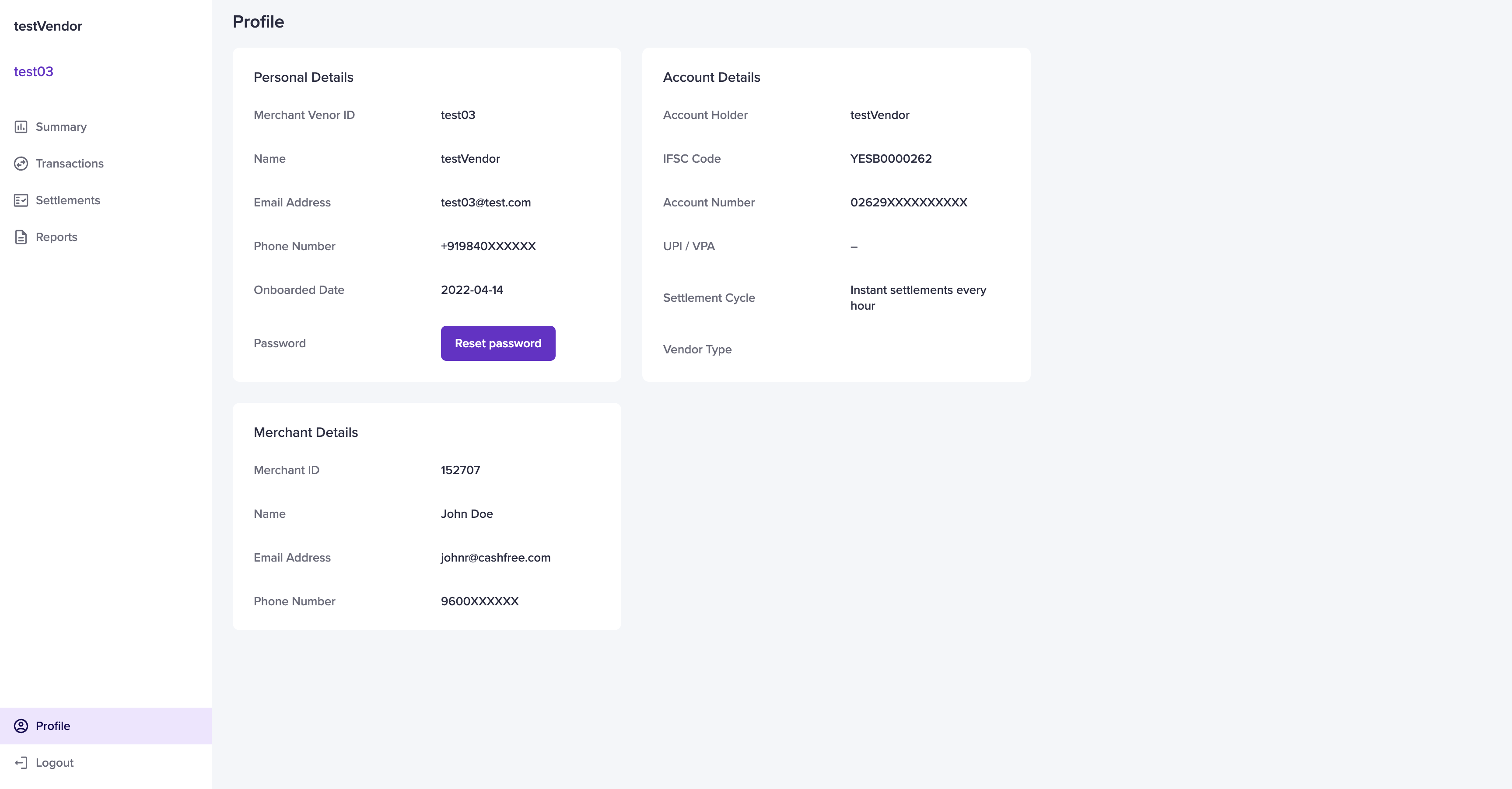
The **Personal Details** section includes:
* Merchant Vendor ID – Unique vendor ID
* Name – Vendor’s full name
* Email Address – Vendor’s registered email
* Phone Number – Vendor’s contact number
* Onboarded Date – Date the vendor was onboarded
* Password – Vendor’s login password
#### Resetting Password
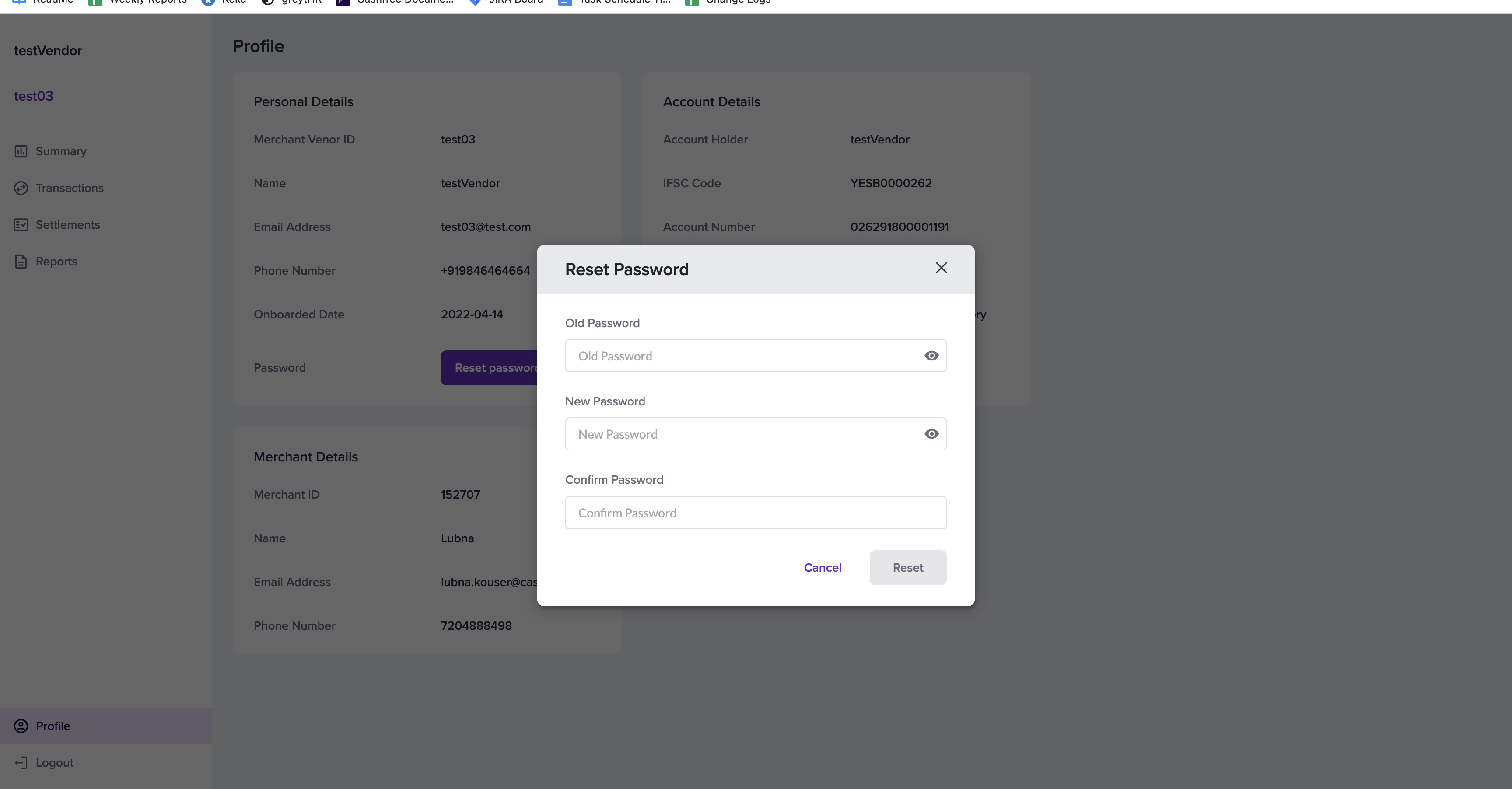
Vendors can reset their password by:
1. Clicking **Reset Password**
2. Entering the old and new passwords
3. Clicking **Reset**
Alternatively, vendors can click **Forgot Password** and follow the instructions in the email sent to their registered email ID.
If the email is not received, please clear the cache and try again in incognito mode.
### Personal Details
The **Personal Details** section includes:
* Merchant Vendor ID – Unique vendor ID
* Name – Vendor’s full name
* Email Address – Vendor’s registered email
* Phone Number – Vendor’s contact number
* Onboarded Date – Date the vendor was onboarded
* Password – Vendor’s login password
#### Resetting Password
Vendors can reset their password by:
1. Clicking **Reset Password**
2. Entering the old and new passwords
3. Clicking **Reset**
Alternatively, vendors can click **Forgot Password** and follow the instructions in the email sent to their registered email ID.
If the email is not received, please clear the cache and try again in incognito mode.
 ### Account Details
The **Account Details** section includes:
* Account Holder – Name of the account holder
* IFSC Code – Bank branch IFSC code
* Account Number – Vendor’s bank account number
* UPI / VPA – Vendor’s UPI ID
* Settlement Cycle – Configured settlement schedule
* Vendor Type – Individual or Business
### Merchant Details
The **Merchant Details** section includes:
* Merchant ID
* Name – Merchant’s name
* Email Address – Merchant’s registered email ID
* Phone Number – Merchant’s contact number
### Account Details
The **Account Details** section includes:
* Account Holder – Name of the account holder
* IFSC Code – Bank branch IFSC code
* Account Number – Vendor’s bank account number
* UPI / VPA – Vendor’s UPI ID
* Settlement Cycle – Configured settlement schedule
* Vendor Type – Individual or Business
### Merchant Details
The **Merchant Details** section includes:
* Merchant ID
* Name – Merchant’s name
* Email Address – Merchant’s registered email ID
* Phone Number – Merchant’s contact number