> ## Documentation Index
> Fetch the complete documentation index at: https://telr-docs.cashfree.com/llms.txt
> Use this file to discover all available pages before exploring further.
# Overview
> Our objective is to provide a safer business environment for you by mitigating risks that involve fraudulent transactions and chargebacks. With RiskShield, you can prevent financial losses because of frauds.
## Why opt for RiskShield?
* **Reduce Fraud**
We help you detect and prevent fraudulent transactions with our advanced artificial intelligence and machine learning algorithms. RiskShield monitors your transactions in real-time to reduce financial losses and lower your exposure to fraud-related risks.
* **Preserve Reputation**
Enhance customer trust and safeguard your reputation by protecting against fraud. Opting for our RiskShield not only prevents fraudulent activities but also fosters a positive relationship with your customers.
* **Improve Transaction Experience**
We accurately distinguish between the legitimate and fraudulent transactions. We help you provide a smoother and a more seamless transactions experience for your customers.
* **Prevent Legal Liabilities**
Minimise the risk of litigation by implementing our RiskShield. With our strenuous effort to prevent fraudulent transactions, you can reduce the chances of legal disputes and safeguard your business from legal challenges.
* **Minimise Debit Freeze**
A bank account debit freeze refers to a temporary restriction placed on the ability to process card transactions. You can prevent this by implementing our preventive measure aimed at protecting you and your customers from risks associated with transactions.
## Activating RiskShield
To provide a safer environment for you, we scan and intercept transactions that may lead to a potential loss of money because of fraudulent activities. Protecting your business from potential chargebacks and fraud is paramount in today's digital landscape. Our advanced machine learning technology, combined with a comprehensive suite of intelligent risk management tools, empowers you to stay ahead of fraudulent activities.
By leveraging cutting-edge algorithms and real-time data analysis, we proactively identify and mitigate risks before they impact your business by blocking the fraudulent transactions. You can [configure smart rules and flag or block transactions](/payments/risk-shield/smart-rules), [create blacklists](/payments/risk-shield/my-blacklists) with RiskShield.
### Activate RiskShield Free Trial
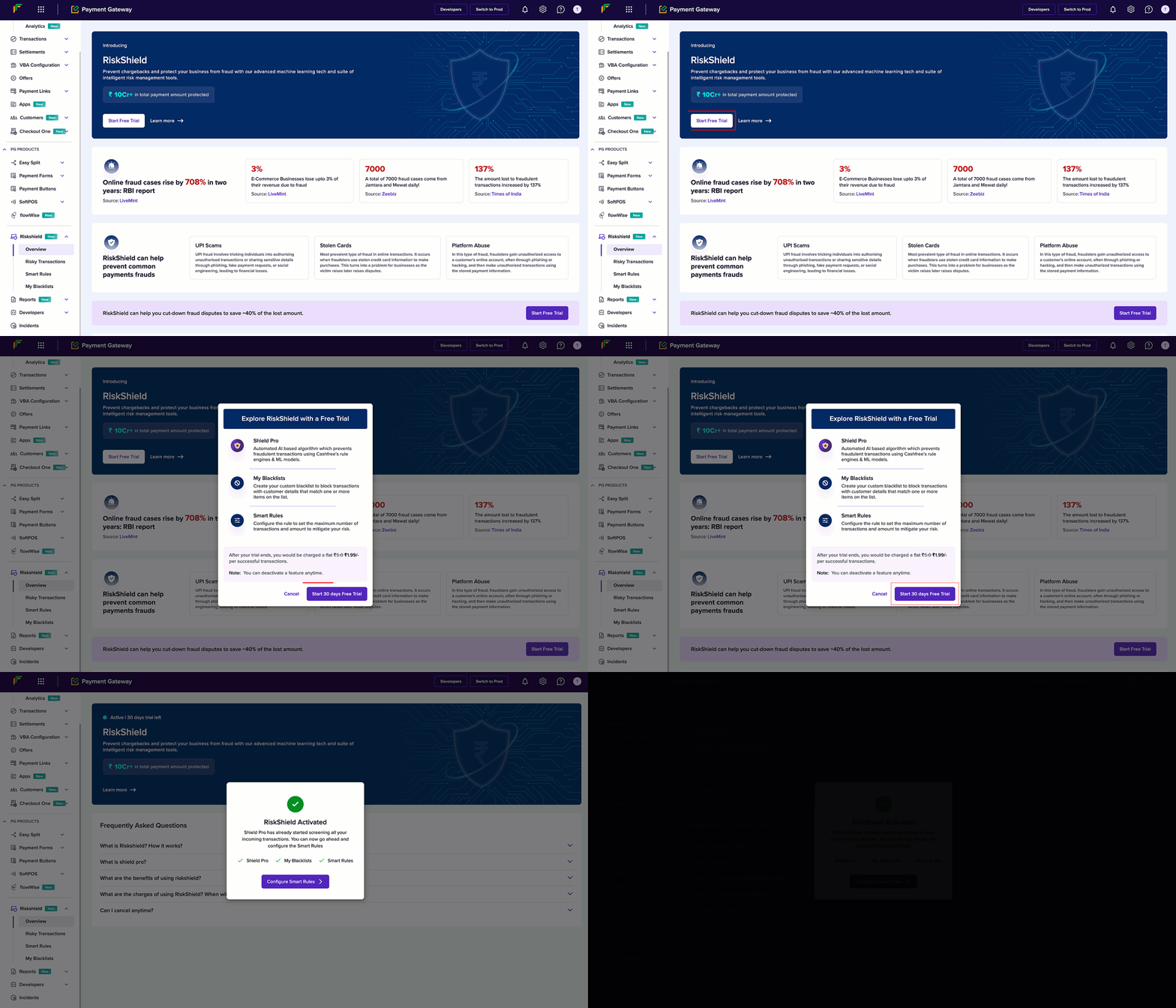
Follow the instructions below to activate RiskShield:
1. Login to the *Payment Gateway* dashboard using your credentials.
2. From the *Overview* screen, navigate to **Riskshield** > **Overview**.
3. Click **Start Free Trial** from the banner.
4. Click **Start 30 days Free Trial**.
You have successfully activated RiskShield. You can use the free trial of RiskShield for 30 days. Click [**Configure Smart Rules** and create custom rules to block or flag transactions.](/payments/risk-shield/smart-rules)
 ### Deactivate RiskShield
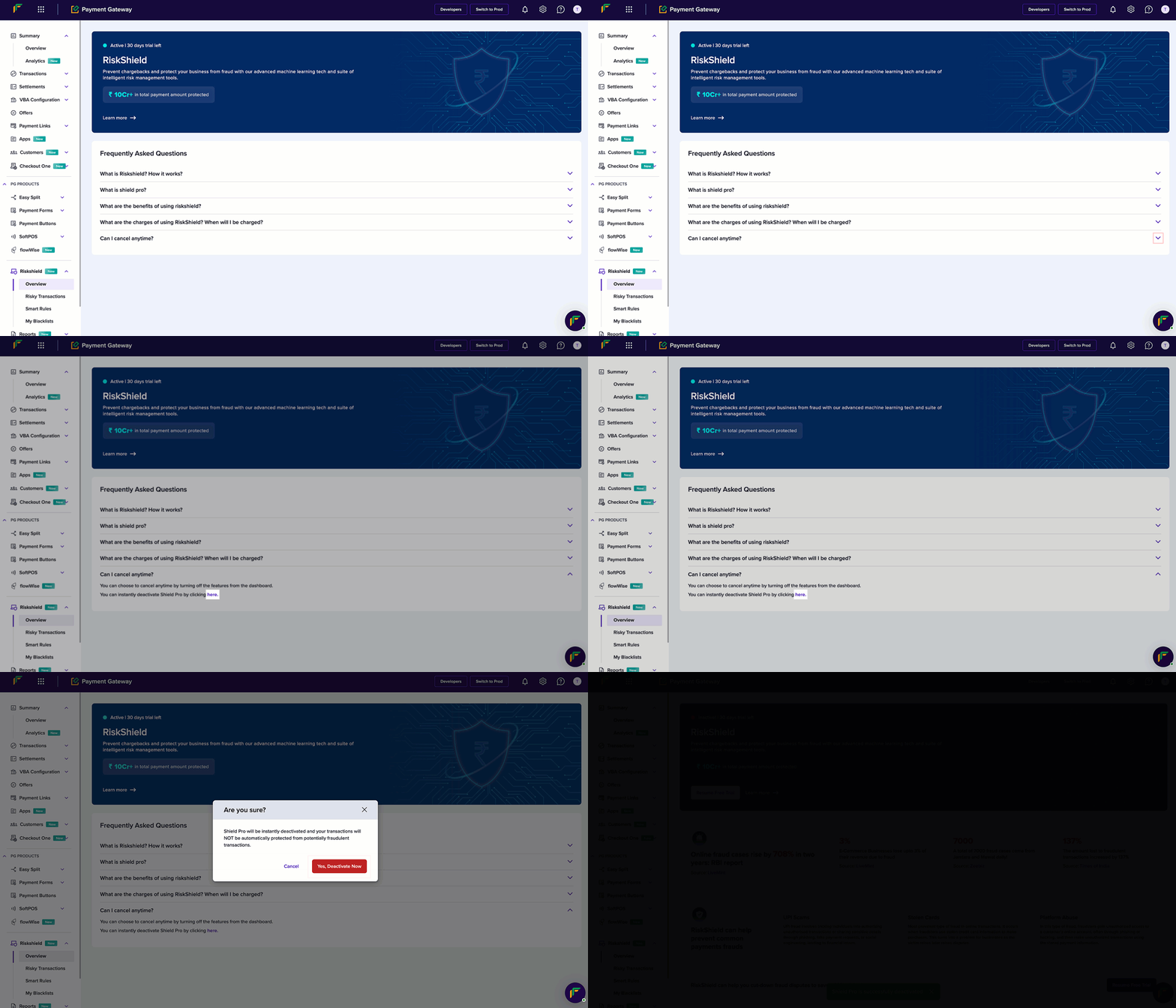
Follow the instructions below to deactivate RiskShield:
1. Login to the *Payment Gateway* dashboard using your credentials.
2. From the *Overview* screen, navigate to **Riskshield** > **Overview**.
3. Click the **Can I cancel anytime** question under *Frequently Asked Questions*.
4. Click **here**.
5. In the *Are you sure?* dialog box, click **Yes, Deactivate Now**.
You have successfully deactivated RiskShield.
### Deactivate RiskShield
Follow the instructions below to deactivate RiskShield:
1. Login to the *Payment Gateway* dashboard using your credentials.
2. From the *Overview* screen, navigate to **Riskshield** > **Overview**.
3. Click the **Can I cancel anytime** question under *Frequently Asked Questions*.
4. Click **here**.
5. In the *Are you sure?* dialog box, click **Yes, Deactivate Now**.
You have successfully deactivated RiskShield.
 ***
### Reactivate RiskShield
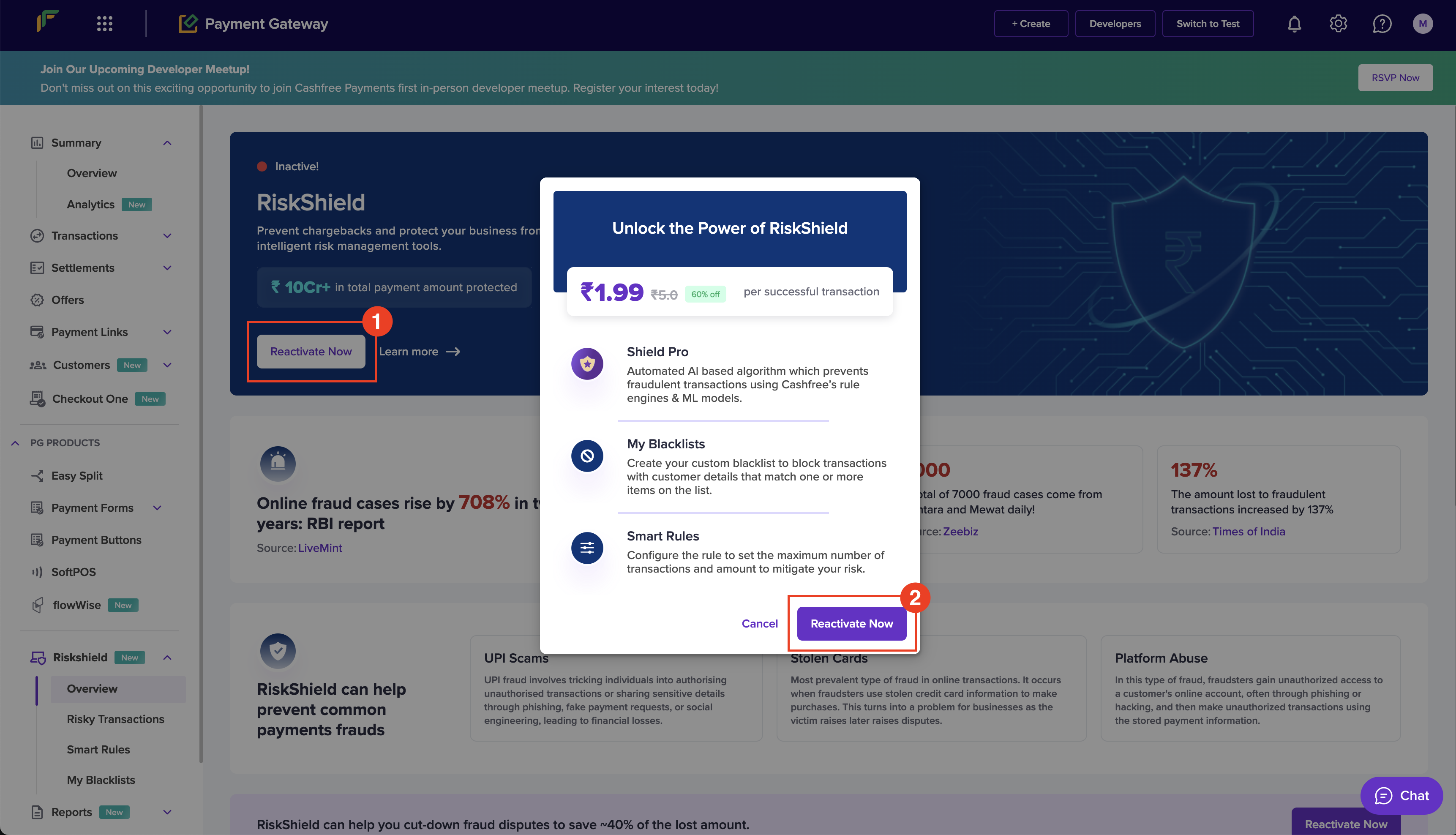
You can reactivate RiskShield any time from the dashboard by following the instructions below:
1. In the *Overview* screen, click **Reactivate Now** from the banner.
2. Click **Reactivate Now** in the popup.
You have successfully reactivated RiskShield.
***
### Reactivate RiskShield
You can reactivate RiskShield any time from the dashboard by following the instructions below:
1. In the *Overview* screen, click **Reactivate Now** from the banner.
2. Click **Reactivate Now** in the popup.
You have successfully reactivated RiskShield.