> ## Documentation Index
> Fetch the complete documentation index at: https://telr-docs.cashfree.com/llms.txt
> Use this file to discover all available pages before exploring further.
# Overview
> Listen on your webhook endpoint so your integration can automatically trigger updates.
When building Telr integrations, you might want your applications to receive events as they occur in your Telr account so that your back-end systems can execute actions accordingly.
To enable real-time event notifications, register your webhook endpoints with Telr (`Developers > Webhooks`). These endpoints will receive HTTP POST requests containing JSON payloads whenever specific events happen in your Telr account. This allows your application to react promptly to changes such as successful payments, failed transactions, or new chargebacks.
Payment Webhooks
Refund Webhooks
Settlement Webhooks
Payment Link Webhooks
### Verify Webhooks
It is essential to verify webhooks to prevent manipulation of the webhook payload through man-in-the-middle (MITM) attacks. Use [webhook signatures](#webhook-signature-verification) to authenticate Telr webhooks, and proceed with further actions only after successful verification
Telr generates the webhook signature based on the raw payload, not the
parsed payload. You can refer to how the popular JavaScript framework
[NestJS](https://docs.nestjs.com/faq/raw-body) provides a hook for accessing
the raw body.
### Test Webhooks
Before going live, you can test your webhooks in the sandbox environment to check payloads and integration. Configuring your webhooks, from the dashboard, in the test environment and events triggered in test transactions will send webhooks to the configured endpoint.
You can create endpoint URLs and test webhooks using tools like
[webhook.site](https://webhook.site) or create a tunnel to your localhost
using tools like [ngrok](https://ngrok.com).
### Duplicate Webhook Processing
We practice **atleast-once** delivery of webhooks to mitigate missing
webhook delivery due to any unforeseen reason.
In case of inadvertent downtimes at Telr or your end, we might attempt to
duplicate webhook delivery to ensure fulfilment.
To prevent business processing of duplicate events at your end, you are strongly
recommended to validate `x-idempotency-header` in each webhook header. This hashed
value will always be unique for each unique webhook payload.
This feature is available on webhook versions starting 2025-01-01. To
migrate to this new version, refer to [Webhook Migration](#webhook-migration)
section below.
### Retry Webhooks Policy
You can also customise and define a retry policy for all webhooks that do not get delivered with a 200 response using your [dashboard](https://telr.cashfree.com/merchants/pg/developers/webhooks?env=prod). We will trigger webhooks to your URLs according to the defined retry policy for each endpoint till the time we get a 200 response. To configure the retry policy:
You will see two types of URLs listed -
1. `NOTIFY_URL` - This is the default configuration added to your account and configurations here cannot be edited or deleted. This configuration will apply to only the URLs sent in the notify\_url param of [Create Order API](/api-reference/payments/latest/orders/create) within the order\_meta object
2. Your custom configured URLs - You can click on 'Edit' and follow the steps on the screen to define a custom retry policy. A default policy is applied to all URLs
The following webhook policy types are available:
* **Default**: The system retries up to three times at 2, 10, and 30-minute intervals.
* **Fixed**: You can specify the number of retries (maximum of 10) and the interval between retries.
* **Exponential**: You can specify the number of retries (maximum of 10), the interval, and a multiplier. For example, if the number of retries is 5, the interval is 15 minutes, and the multiplier is 2, retries occur at 15, 17, 19, 23, and 31-minute intervals.
* **Custom**: You can specify the number of retries (maximum of 10) and define custom intervals.
### Resend Webhooks
This feature is only available for [`payment` webhooks](/api-reference/payments/latest/payments/webhooks)
There are various reasons why you might need to resend a webhook response again to your endpoint. Common reasons include service level downtime, failure to register webhook payload etc. With Telr, you can resend the webhooks that have been previously triggered. Simply log on to your dashboard and follow the steps below:
1. Go to Webhooks under the Developer section and go to 'Logs'
2. On the top right, click on the 'Batch Resend' button
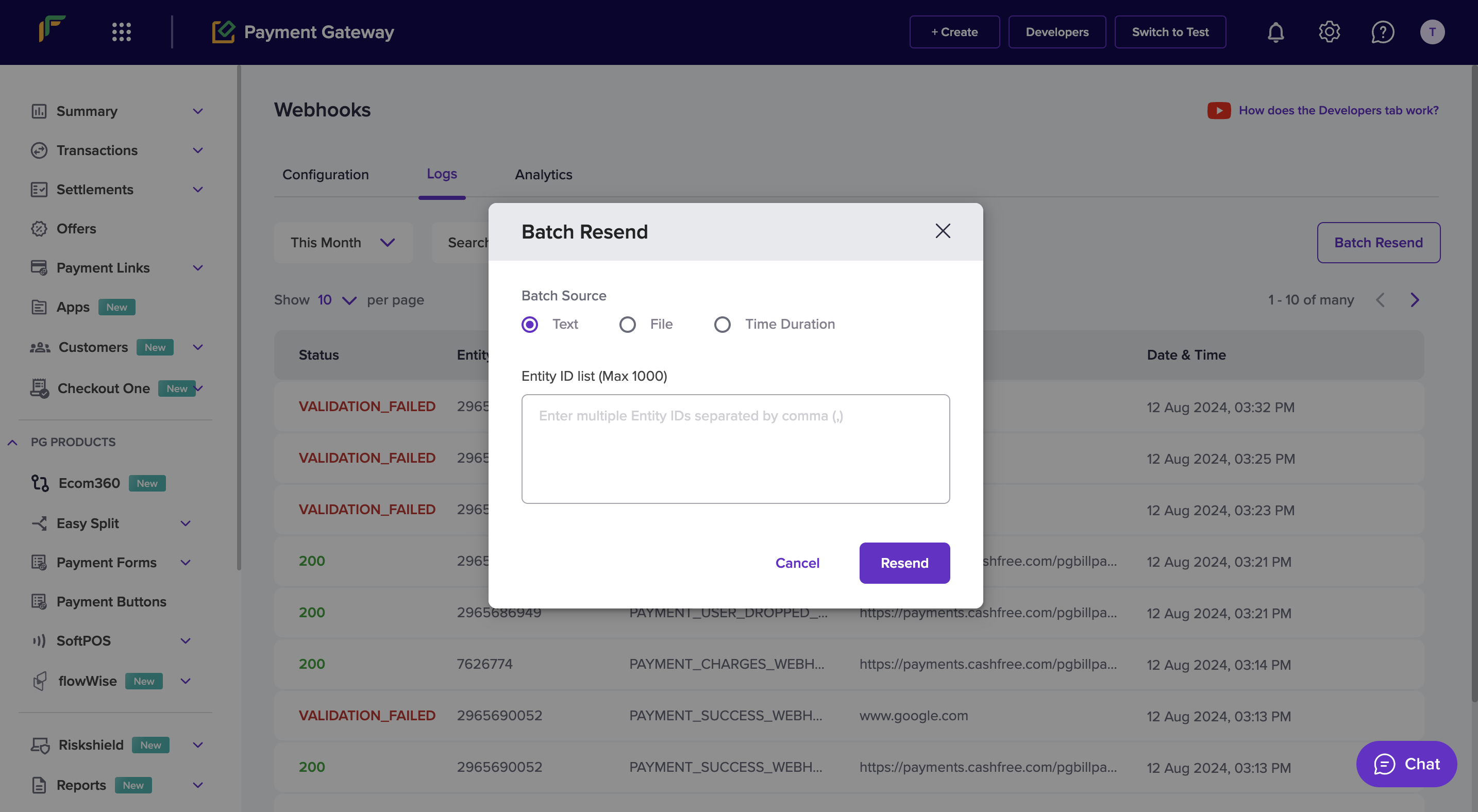 3. You will see three options here:
* Text - simple enter transaction IDs (comma separated) in the text box and click 'Resend'. Transaction IDs are the same as Entity IDs listed on the logs dashboard
* File - upload the file in the required format (downloadable from the dashboard) with the required Transaction IDs and click 'Resend'
* Time Duration - select the time period (max. allowed duration is 24 hours) and click 'Resend'
### Webhook Signature verification
Telr generates the webhook signature based on the raw payload, not the
parsed payload. You can refer to how the popular JavaScript framework
[NestJS](https://docs.nestjs.com/faq/raw-body) provides a hook for accessing
the raw body.
The signature must be used to verify if the request has not been tampered with. To verify the signature at your end, you will need your Telr PG secret key along with the payload.
* The timestamp is present in the header `x-webhook-timestamp`.
* The actual signature is present in the header `x-webhook-signature`.
```bash signature-verification theme={null}
timestamp := 1617695238078;
signedPayload := $timestamp.$payload;
expectedSignature := Base64Encode(HMACSHA256($signedPayload, $merchantSecretKey));
```
### SDK Verification (Built-in Approach)
```javascript Node (express) theme={null}
var express = require('express')
import { Cashfree } from "cashfree-pg";
var app = express()
Cashfree.XClientId = "";
Cashfree.XClientSecret = "";
Cashfree.XEnvironment = Cashfree.Environment.SANDBOX;
app.post('/webhook', function (req, res) {
try {
Cashfree.PGVerifyWebhookSignature(req.headers["x-webhook-signature"], req.rawBody, req.headers["x-webhook-timestamp"])
} catch (err) {
console.log(err.message)
}
})
```
```go golang theme={null}
import (
cashfree "github.com/cashfree/cashfree-pg/v4"
)
// Route
e.POST("/webhook", _this.Webhook)
// Controller
func (_this *WebhookRoute) Webhook(c echo.Context) error {
clientId := ""
clientSecret := ""
cashfree.XClientId = &clientId
cashfree.XClientSecret = &clientSecret
cashfree.XEnvironment = cashfree.SANDBOX
signature := c.Request().Header.Get("x-webhook-signature")
timestamp := c.Request().Header.Get("x-webhook-timestamp")
body, _ := ioutil.ReadAll(c.Request().Body)
rawBody := string(body)
webhookEvent, err := cashfree.PGVerifyWebhookSignature(signature, rawBody, timestamp)
if err != nil {
fmt.Println(err.Error())
} else {
fmt.Println(webhookEvent.Object)
}
}
```
```php PHP theme={null}
";
\Cashfree\Cashfree::$XClientSecret = "";
$cashfree = new \Cashfree\Cashfree();
try {
$response = cashfree->PGVerifyWebhookSignature($expectedSig, $inputJSON, $ts);
} catch(Exception $e) {
// Error if signature verification fails
}
?>
```
```python Python theme={null}
from cashfree_pg.api_client import Cashfree
@app.route('/webhook', methods = ['POST'])
def disp():
# Get the raw body from the request
raw_body = request.data
# Decode the raw body bytes into a string
decoded_body = raw_body.decode('utf-8')
#verify_signature
timestamp = request.headers['x-webhook-timestamp']
signature = request.headers['x-webhook-signature']
cashfree = Cashfree()
cashfree.XClientId = ""
cashfree.XClientSecret = ""
try:
cashfreeWebhookResponse = cashfree.PGVerifyWebhookSignature(signature, decoded_body, timestamp)
except:
# If Signature mis-match
```
```java Java theme={null}
import com.cashfree.*;
@PostMapping("/my-endpoint")
public String handlePost(HttpServletRequest request) throws IOException {
Cashfree.XClientId = "";
Cashfree.XClientSecret = "";
Cashfree.XEnvironment = Cashfree.SANDBOX;
StringBuilder stringBuilder = new StringBuilder();
BufferedReader bufferedReader = null;
try {
bufferedReader = request.getReader();
String line;
while ((line = bufferedReader.readLine()) != null) {
stringBuilder.append(line).append('\n');
}
String rawBody = stringBuilder.toString();
String signature = request.getHeader("x-webhook-signature");
String timestamp = request.getHeader("x-webhook-timestamp");
Cashfree cashfree = new Cashfree();
PGWebhookEvent webhook = cashfree.PGVerifyWebhookSignature(signature, rawBody, timestamp);
} catch (Exception e) {
// Error if verification fails
} finally {
if (bufferedReader != null) {
bufferedReader.close();
}
}
}
```
```csharp csharp theme={null}
using cashfree_pg.Client;
using cashfree_pg.Model;
[Route("api/[controller]")]
[ApiController]
public class YourController : ControllerBase
{
[HttpPost]
public async Task Post()
{
// Read the raw body of the POST request
using (StreamReader reader = new StreamReader(Request.Body, Encoding.UTF8))
{
string requestBody = await reader.ReadToEndAsync();
var headers = Request.Headers;
var signature = headers["x-webhook-signature"];
var timestamp = headers["x-webhook-timestamp"];
Cashfree.XClientId = "";
Cashfree.XClientSecret = "";
Cashfree.XEnvironment = Cashfree.SANDBOX;
var cashfree = new Cashfree();
try {
var response = cashfree.PGVerifyWebhookSignature(signature, requestBody, timestamp);
} catch(Exception e) {
// Error if signature mis matches
}
}
}
}
```
### Manual Verification (Custom Approach)
```javascript Node (Express) theme={null}
function verify(ts, request){
const body = request.headers['x-webhook-timestamp'] + request.rawBody
const secretKey = ;
let generatedSignature = crypto.createHmac('sha256', secretKey).update(body).digest("base64");
const signature = request.headers['x-webhook-signature']
if(generatedSignature === signature) {
let jsonObject = JSON.parse(rawBody)
return jsonObject
}
throw new Error("Generated signature and received signature did not match.");
}
```
```go golang theme={null}
func VerifySignature(expectedSig string, ts string, body string) (string, error) {
clientSecret := ""
signatureString := ts + rawBody
hmacInstance := hmac.New(sha256.New, []byte(*clientSecret))
hmacInstance.Write([]byte(signatureString))
bytesData := hmacInstance.Sum(nil)
generatedSignature := base64.StdEncoding.EncodeToString(bytesData)
if generatedSignature == expectedSig {
var object interface{}
err := json.Unmarshal([]byte(rawBody), &object)
if err != nil {
return nil, errors.New("something went wrong when unmarshalling raw body")
}
if objectAsMapInterface, ok := object.(map[string]interface{}); ok {
if webhookType, ok := objectAsMapInterface["type"].(string); ok {
return "signatures match", nil
}
}
return "", nil
}
return nil, errors.New("generated signature and received signature did not match")
}
timestamp := c.Request().Header.Get("x-webhook-timestamp")
body, _ := ioutil.ReadAll(c.Request().Body)
rawBody := string(body)
signature := c.Request().Header.Get("x-webhook-signature")
VerifySignature(signature, timestamp, rawBody)
```
```php PHP theme={null}
function computeSignature($ts, $rawBody){
$rawBody = file_get_contents('php://input');
$timestamp = getallheaders()['x-webhook-timestamp'];
$signature = getallheaders()['x-webhook-signature'];
$body = $timestamp . $rawBody;
$secretKey = "";
$genSignature = hash_hmac('sha256', $body, $secretKey, true);
$genSignatureBase64 = base64_encode($genSignature);
if($genSignatureBase64 == $signature) {
$jsonResponse = json_decode($rawBody);
return $jsonResponse;
}
throw new Exception("Generated signature and received signature did not match.");
}
```
```java Java theme={null}
public Object generateSignature() {
try {
String data = headers.get("x-webhook-timestamp") + rawBody;
String secretKey = "";
Mac sha256_HMAC = Mac.getInstance("HmacSHA256");
SecretKeySpec secret_key_spec = new SecretKeySpec(secretKey.getBytes(), "HmacSHA256");
sha256_HMAC.init(secret_key_spec);
String computed_signature = Base64.getEncoder().encodeToString(sha256_HMAC.doFinal(data.getBytes()));
String signature = headers.get("x-webhook-signature")
if(computed_signature.equals(signature)) {
Gson g = new Gson();
Object response = g.fromJson(rawBody, Object.class);
return response;
}
throw new Exception("Generated signature and received signature did not match.");
} catch (Exception e) {
throw e;
}
}
```
```python Python theme={null}
import base64
import hashlib
import hmac
def generateSignature():
raw_body = request.data
timestamp = request.headers['x-webhook-timestamp']
signature = request.headers['x-webhook-signature']
signatureData = timestamp+rawBody
message = bytes(signatureData, 'utf-8')
secretkey=bytes("",'utf-8')
generatedSignature = base64.b64encode(hmac.new(secretkey, message, digestmod=hashlib.sha256).digest())
computed_signature = str(generatedSignature, encoding='utf8')
if computed_signature == signature:
json_response = json.loads(rawBody)
return json_response
raise Exception("Generated signature and received signature did not match.")
```
### Webhook Migration
Webhook endpoints have a specific API version set, for example, `2023-08-01`. To migrate from an older version to a newer version, we recommend the following steps:
Create a new webhook endpoint with the new URL and new version. Subscribe to
the events you want to consume.
Update your event processing code and return a 200 response to prevent
delivery retries. Next, enable the new webhook endpoint that you created in
the previous step. At this point, every event is sent twice: once with the
old API version and once with the new one.
Update your code to ensure you can process the version of your new webhook
endpoint. Make sure you read the changelog and handle any breaking changes.
If events aren’t being correctly handled by your new code, first temporarily
disable the new webhook endpoint. After monitoring for some time, you can
permanently delete the old webhook endpoint.
3. You will see three options here:
* Text - simple enter transaction IDs (comma separated) in the text box and click 'Resend'. Transaction IDs are the same as Entity IDs listed on the logs dashboard
* File - upload the file in the required format (downloadable from the dashboard) with the required Transaction IDs and click 'Resend'
* Time Duration - select the time period (max. allowed duration is 24 hours) and click 'Resend'
### Webhook Signature verification
Telr generates the webhook signature based on the raw payload, not the
parsed payload. You can refer to how the popular JavaScript framework
[NestJS](https://docs.nestjs.com/faq/raw-body) provides a hook for accessing
the raw body.
The signature must be used to verify if the request has not been tampered with. To verify the signature at your end, you will need your Telr PG secret key along with the payload.
* The timestamp is present in the header `x-webhook-timestamp`.
* The actual signature is present in the header `x-webhook-signature`.
```bash signature-verification theme={null}
timestamp := 1617695238078;
signedPayload := $timestamp.$payload;
expectedSignature := Base64Encode(HMACSHA256($signedPayload, $merchantSecretKey));
```
### SDK Verification (Built-in Approach)
```javascript Node (express) theme={null}
var express = require('express')
import { Cashfree } from "cashfree-pg";
var app = express()
Cashfree.XClientId = "";
Cashfree.XClientSecret = "";
Cashfree.XEnvironment = Cashfree.Environment.SANDBOX;
app.post('/webhook', function (req, res) {
try {
Cashfree.PGVerifyWebhookSignature(req.headers["x-webhook-signature"], req.rawBody, req.headers["x-webhook-timestamp"])
} catch (err) {
console.log(err.message)
}
})
```
```go golang theme={null}
import (
cashfree "github.com/cashfree/cashfree-pg/v4"
)
// Route
e.POST("/webhook", _this.Webhook)
// Controller
func (_this *WebhookRoute) Webhook(c echo.Context) error {
clientId := ""
clientSecret := ""
cashfree.XClientId = &clientId
cashfree.XClientSecret = &clientSecret
cashfree.XEnvironment = cashfree.SANDBOX
signature := c.Request().Header.Get("x-webhook-signature")
timestamp := c.Request().Header.Get("x-webhook-timestamp")
body, _ := ioutil.ReadAll(c.Request().Body)
rawBody := string(body)
webhookEvent, err := cashfree.PGVerifyWebhookSignature(signature, rawBody, timestamp)
if err != nil {
fmt.Println(err.Error())
} else {
fmt.Println(webhookEvent.Object)
}
}
```
```php PHP theme={null}
";
\Cashfree\Cashfree::$XClientSecret = "";
$cashfree = new \Cashfree\Cashfree();
try {
$response = cashfree->PGVerifyWebhookSignature($expectedSig, $inputJSON, $ts);
} catch(Exception $e) {
// Error if signature verification fails
}
?>
```
```python Python theme={null}
from cashfree_pg.api_client import Cashfree
@app.route('/webhook', methods = ['POST'])
def disp():
# Get the raw body from the request
raw_body = request.data
# Decode the raw body bytes into a string
decoded_body = raw_body.decode('utf-8')
#verify_signature
timestamp = request.headers['x-webhook-timestamp']
signature = request.headers['x-webhook-signature']
cashfree = Cashfree()
cashfree.XClientId = ""
cashfree.XClientSecret = ""
try:
cashfreeWebhookResponse = cashfree.PGVerifyWebhookSignature(signature, decoded_body, timestamp)
except:
# If Signature mis-match
```
```java Java theme={null}
import com.cashfree.*;
@PostMapping("/my-endpoint")
public String handlePost(HttpServletRequest request) throws IOException {
Cashfree.XClientId = "";
Cashfree.XClientSecret = "";
Cashfree.XEnvironment = Cashfree.SANDBOX;
StringBuilder stringBuilder = new StringBuilder();
BufferedReader bufferedReader = null;
try {
bufferedReader = request.getReader();
String line;
while ((line = bufferedReader.readLine()) != null) {
stringBuilder.append(line).append('\n');
}
String rawBody = stringBuilder.toString();
String signature = request.getHeader("x-webhook-signature");
String timestamp = request.getHeader("x-webhook-timestamp");
Cashfree cashfree = new Cashfree();
PGWebhookEvent webhook = cashfree.PGVerifyWebhookSignature(signature, rawBody, timestamp);
} catch (Exception e) {
// Error if verification fails
} finally {
if (bufferedReader != null) {
bufferedReader.close();
}
}
}
```
```csharp csharp theme={null}
using cashfree_pg.Client;
using cashfree_pg.Model;
[Route("api/[controller]")]
[ApiController]
public class YourController : ControllerBase
{
[HttpPost]
public async Task Post()
{
// Read the raw body of the POST request
using (StreamReader reader = new StreamReader(Request.Body, Encoding.UTF8))
{
string requestBody = await reader.ReadToEndAsync();
var headers = Request.Headers;
var signature = headers["x-webhook-signature"];
var timestamp = headers["x-webhook-timestamp"];
Cashfree.XClientId = "";
Cashfree.XClientSecret = "";
Cashfree.XEnvironment = Cashfree.SANDBOX;
var cashfree = new Cashfree();
try {
var response = cashfree.PGVerifyWebhookSignature(signature, requestBody, timestamp);
} catch(Exception e) {
// Error if signature mis matches
}
}
}
}
```
### Manual Verification (Custom Approach)
```javascript Node (Express) theme={null}
function verify(ts, request){
const body = request.headers['x-webhook-timestamp'] + request.rawBody
const secretKey = ;
let generatedSignature = crypto.createHmac('sha256', secretKey).update(body).digest("base64");
const signature = request.headers['x-webhook-signature']
if(generatedSignature === signature) {
let jsonObject = JSON.parse(rawBody)
return jsonObject
}
throw new Error("Generated signature and received signature did not match.");
}
```
```go golang theme={null}
func VerifySignature(expectedSig string, ts string, body string) (string, error) {
clientSecret := ""
signatureString := ts + rawBody
hmacInstance := hmac.New(sha256.New, []byte(*clientSecret))
hmacInstance.Write([]byte(signatureString))
bytesData := hmacInstance.Sum(nil)
generatedSignature := base64.StdEncoding.EncodeToString(bytesData)
if generatedSignature == expectedSig {
var object interface{}
err := json.Unmarshal([]byte(rawBody), &object)
if err != nil {
return nil, errors.New("something went wrong when unmarshalling raw body")
}
if objectAsMapInterface, ok := object.(map[string]interface{}); ok {
if webhookType, ok := objectAsMapInterface["type"].(string); ok {
return "signatures match", nil
}
}
return "", nil
}
return nil, errors.New("generated signature and received signature did not match")
}
timestamp := c.Request().Header.Get("x-webhook-timestamp")
body, _ := ioutil.ReadAll(c.Request().Body)
rawBody := string(body)
signature := c.Request().Header.Get("x-webhook-signature")
VerifySignature(signature, timestamp, rawBody)
```
```php PHP theme={null}
function computeSignature($ts, $rawBody){
$rawBody = file_get_contents('php://input');
$timestamp = getallheaders()['x-webhook-timestamp'];
$signature = getallheaders()['x-webhook-signature'];
$body = $timestamp . $rawBody;
$secretKey = "";
$genSignature = hash_hmac('sha256', $body, $secretKey, true);
$genSignatureBase64 = base64_encode($genSignature);
if($genSignatureBase64 == $signature) {
$jsonResponse = json_decode($rawBody);
return $jsonResponse;
}
throw new Exception("Generated signature and received signature did not match.");
}
```
```java Java theme={null}
public Object generateSignature() {
try {
String data = headers.get("x-webhook-timestamp") + rawBody;
String secretKey = "";
Mac sha256_HMAC = Mac.getInstance("HmacSHA256");
SecretKeySpec secret_key_spec = new SecretKeySpec(secretKey.getBytes(), "HmacSHA256");
sha256_HMAC.init(secret_key_spec);
String computed_signature = Base64.getEncoder().encodeToString(sha256_HMAC.doFinal(data.getBytes()));
String signature = headers.get("x-webhook-signature")
if(computed_signature.equals(signature)) {
Gson g = new Gson();
Object response = g.fromJson(rawBody, Object.class);
return response;
}
throw new Exception("Generated signature and received signature did not match.");
} catch (Exception e) {
throw e;
}
}
```
```python Python theme={null}
import base64
import hashlib
import hmac
def generateSignature():
raw_body = request.data
timestamp = request.headers['x-webhook-timestamp']
signature = request.headers['x-webhook-signature']
signatureData = timestamp+rawBody
message = bytes(signatureData, 'utf-8')
secretkey=bytes("",'utf-8')
generatedSignature = base64.b64encode(hmac.new(secretkey, message, digestmod=hashlib.sha256).digest())
computed_signature = str(generatedSignature, encoding='utf8')
if computed_signature == signature:
json_response = json.loads(rawBody)
return json_response
raise Exception("Generated signature and received signature did not match.")
```
### Webhook Migration
Webhook endpoints have a specific API version set, for example, `2023-08-01`. To migrate from an older version to a newer version, we recommend the following steps:
Create a new webhook endpoint with the new URL and new version. Subscribe to
the events you want to consume.
Update your event processing code and return a 200 response to prevent
delivery retries. Next, enable the new webhook endpoint that you created in
the previous step. At this point, every event is sent twice: once with the
old API version and once with the new one.
Update your code to ensure you can process the version of your new webhook
endpoint. Make sure you read the changelog and handle any breaking changes.
If events aren’t being correctly handled by your new code, first temporarily
disable the new webhook endpoint. After monitoring for some time, you can
permanently delete the old webhook endpoint.