> ## Documentation Index
> Fetch the complete documentation index at: https://telr-docs.cashfree.com/llms.txt
> Use this file to discover all available pages before exploring further.
# API Logs and Metrics
Telr notifies you when a certain API threshold on a alert is crossed. For
example, you might create a api alert to notify you when an certain api is
responding with non 200 response more than 10% of time.
## API Logs
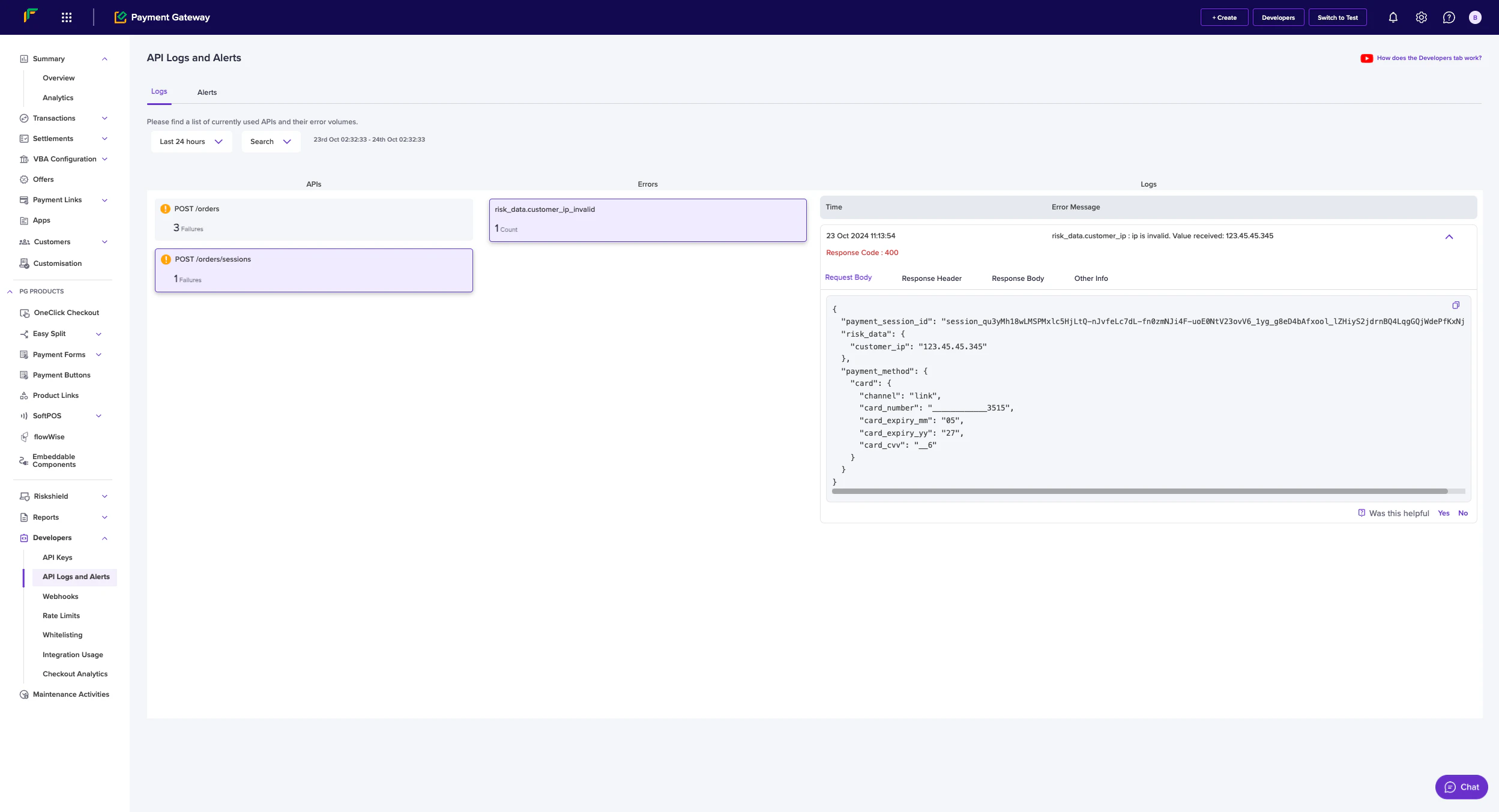
API logs provide real-time visibility into your integration's API calls and their responses. The logging system captures detailed information about each request, making it easier to monitor and troubleshoot your implementation.
To access:
1. Log in to the [merchant dashboard](https://telr.cashfree.com/merchants) using your login credentials.
2. Select **Payment Gateway** on the home page.
3. Select **API Logs and Alerts** under the **Developers** section.
4. Select the **Logs** tab.
 ##### Error Tracking
* Errors are categorized by API endpoint
* Each error shows a count of occurrences
* Detailed error messages help identify the root cause
* Example error format: "risk\_data.customer\_ip is Invalid. Value received: 123.45.45.345"
## API Alerts
Alerts can be configured to monitor API performance and notify you of potential issues. The alert system helps you proactively manage your integration.
To access:
1. Log in to the [merchant dashboard](https://telr.cashfree.com/merchants) using your login credentials.
2. Select **Payment Gateway** on the home page.
3. Select **API Logs and Alerts** under the **Developers** section.
4. Select the **Alerts** tab.
* **API Alert**: Monitor specific API endpoints
* **Rate Limit Warning**: Track API usage against rate limits
##### Error Tracking
* Errors are categorized by API endpoint
* Each error shows a count of occurrences
* Detailed error messages help identify the root cause
* Example error format: "risk\_data.customer\_ip is Invalid. Value received: 123.45.45.345"
## API Alerts
Alerts can be configured to monitor API performance and notify you of potential issues. The alert system helps you proactively manage your integration.
To access:
1. Log in to the [merchant dashboard](https://telr.cashfree.com/merchants) using your login credentials.
2. Select **Payment Gateway** on the home page.
3. Select **API Logs and Alerts** under the **Developers** section.
4. Select the **Alerts** tab.
* **API Alert**: Monitor specific API endpoints
* **Rate Limit Warning**: Track API usage against rate limits
 ##### Alert Details
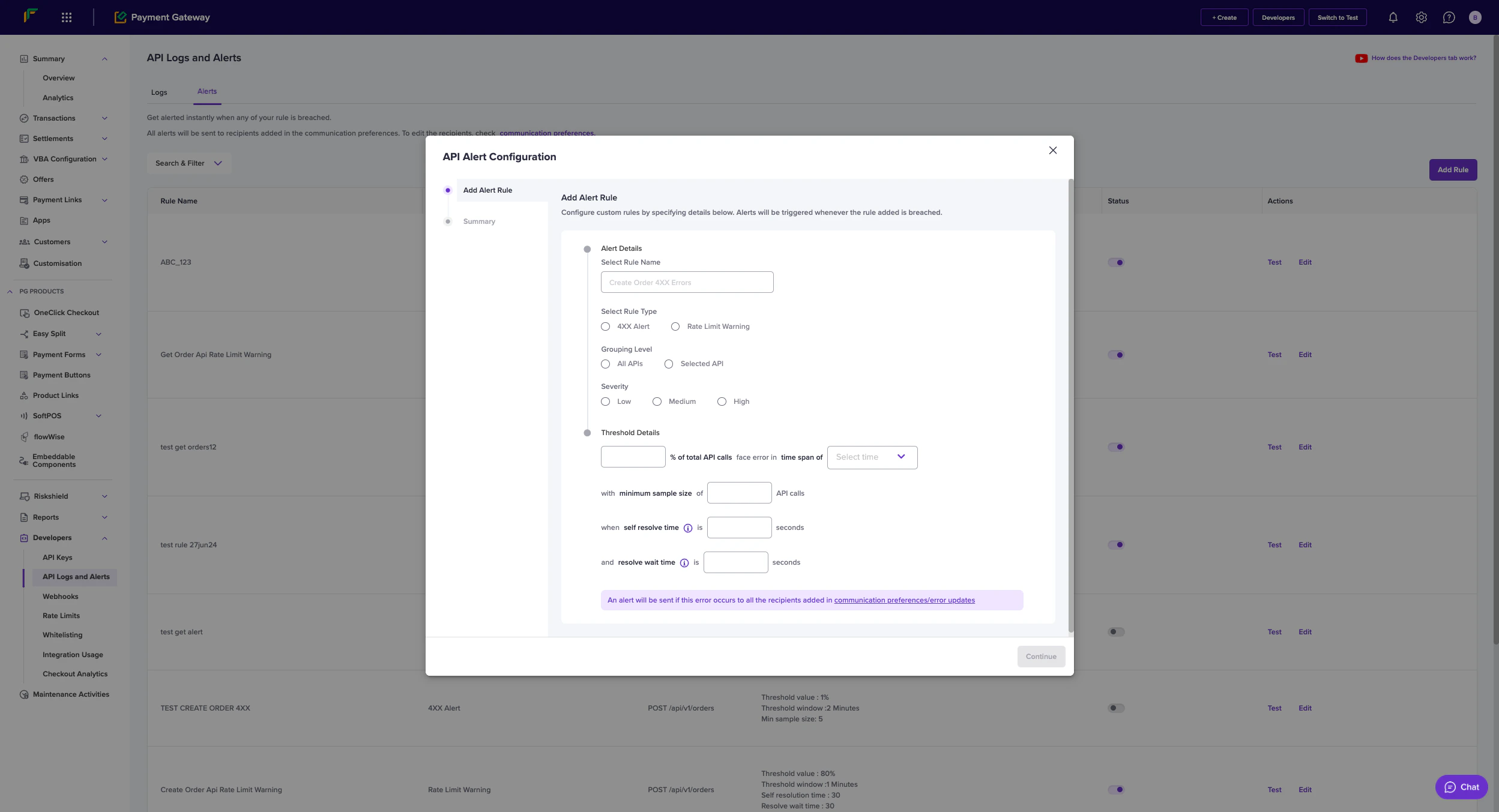
* **Rule Name**: Custom identifier for the alert
* **Rule Type**: Choose between API Alert or Rate Limit Warning
* **Grouping Level**:
* All APIs
* Selected API
##### Severity Levels
* Low
* Medium
* High
##### Threshold Configuration
* **Error Percentage**: Set the threshold for error rate
* **Time Window**: Select the monitoring period
* **Minimum Sample Size**: Minimum number of API calls required
* **Self Resolve Time**: Duration after which alert auto-resolves
* **Resolve Wait Time**: Waiting period before marking as resolved
##### Alert Management
* **Test**: Verify alert configuration
* **Edit**: Modify existing alert rules
* **Status**: Monitor active/inactive state
* **Actions**: Available actions for each alert rule
##### Best Practices
1. Set appropriate threshold values based on your business requirements
2. Configure different severity levels for different types of issues
3. Maintain a minimum sample size to avoid false positives
4. Set reasonable self-resolve and wait times
5. Regularly review and update alert configurations
##### Communication
* Alerts are sent to recipients specified in communication preferences
* Multiple recipients can be configured for different alert types
* Alerts include detailed information about the triggering event
##### Alert Details
* **Rule Name**: Custom identifier for the alert
* **Rule Type**: Choose between API Alert or Rate Limit Warning
* **Grouping Level**:
* All APIs
* Selected API
##### Severity Levels
* Low
* Medium
* High
##### Threshold Configuration
* **Error Percentage**: Set the threshold for error rate
* **Time Window**: Select the monitoring period
* **Minimum Sample Size**: Minimum number of API calls required
* **Self Resolve Time**: Duration after which alert auto-resolves
* **Resolve Wait Time**: Waiting period before marking as resolved
##### Alert Management
* **Test**: Verify alert configuration
* **Edit**: Modify existing alert rules
* **Status**: Monitor active/inactive state
* **Actions**: Available actions for each alert rule
##### Best Practices
1. Set appropriate threshold values based on your business requirements
2. Configure different severity levels for different types of issues
3. Maintain a minimum sample size to avoid false positives
4. Set reasonable self-resolve and wait times
5. Regularly review and update alert configurations
##### Communication
* Alerts are sent to recipients specified in communication preferences
* Multiple recipients can be configured for different alert types
* Alerts include detailed information about the triggering event