> ## Documentation Index
> Fetch the complete documentation index at: https://telr-docs.cashfree.com/llms.txt
> Use this file to discover all available pages before exploring further.
# Webhooks
> In this article, you will learn about Payment Form Webhooks and how to configure them from the Payment Gateway Dashboard.
**Configure Webhooks**
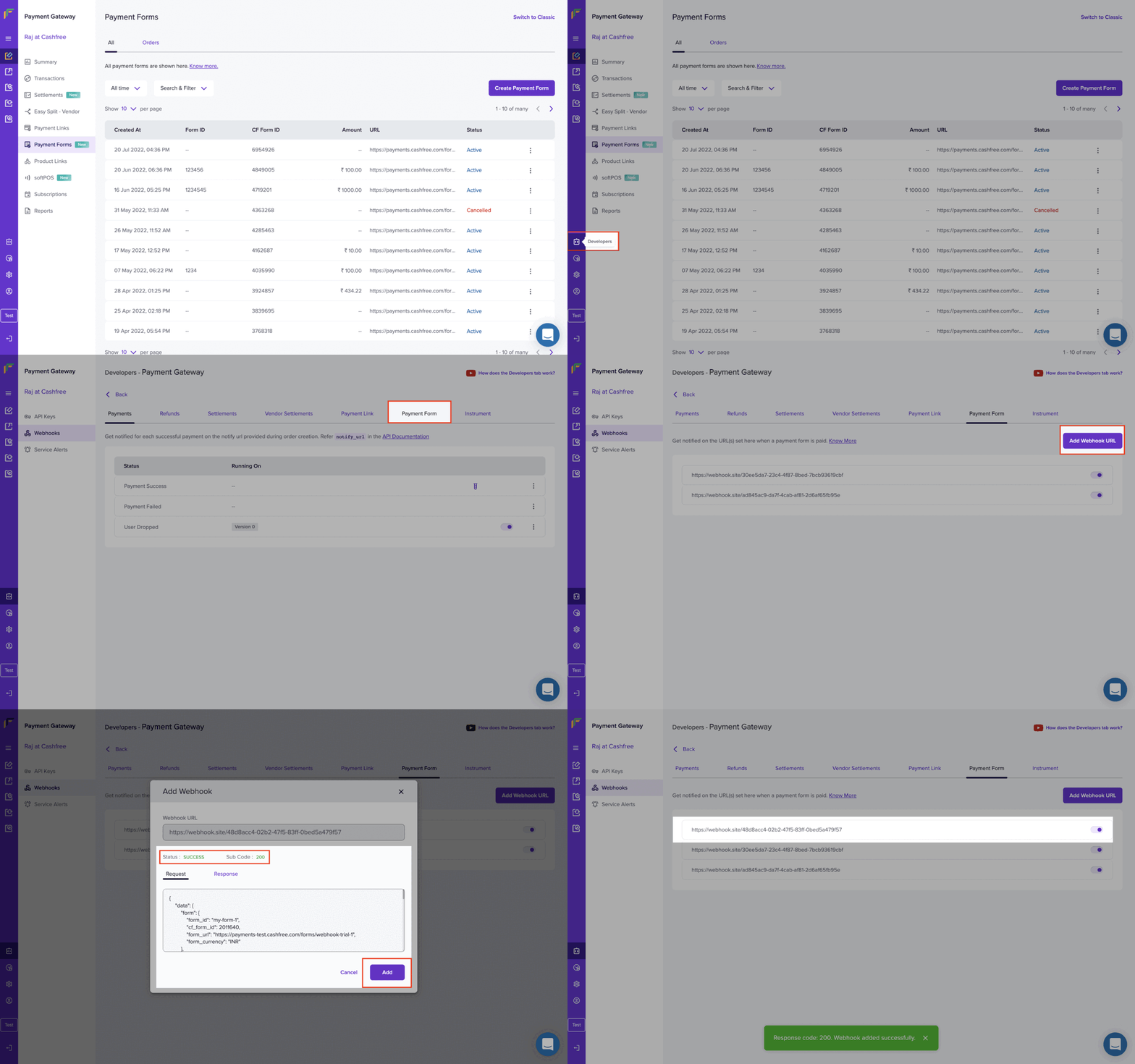
To start receiving webhook event notifications,
1. Go to **Payment Gateway Dashboard** > click **Developers** in the left navigation.
2. Select **Webhooks** in the **Payment Gateway** section.
3. Click **Add Webhook URL** and select the event you want to be notified about.
4. Enter the URL where you want to receive the webhook notifications, and click **Add**.
You will start to receive webhook event notifications on the URLs you have specified. You can use one URL to handle several different event types at once or specify individual URLs for specific events.
 ## Payment Forms Sample Payload
```
{
"data": {
"form": {
"form_id": "my-form-1",
"cf_form_id": 2011640,
"form_url": "https://payments-test.cashfree.com/forms/webhook-trial-1",
"form_currency": "INR"
},
"order": {
"order_amount": 22.00,
"order_id": "CFPay_U1mgll3c0e9g_ehdcjjbtckf",
"order_status": "PAID",
"transaction_id": 1021206,
"customer_details": {
"customer_phone": "9999999999",
"customer_email": "john@gmail.com",
"customer_name": "John Doe",
"customer_fields": [
{
"title": "Zoom ID",
"value": "john"
},
{
"title": "Company Designation",
"value": ""
}
]
},
"amount_details": [
{
"title": "Webinar Tickets",
"value": 398,
"quantity": 2
},
{
"title": "Zoom Platform Fee",
"value": 10
},
{
"title": "Buy me a coffee :)",
"value": 0
},
{
"title": "Amount Dropdown Trial",
"value": 50,
"selectedoption": "Option 1"
}
]
```
## Payment Forms Sample Payload
```
{
"data": {
"form": {
"form_id": "my-form-1",
"cf_form_id": 2011640,
"form_url": "https://payments-test.cashfree.com/forms/webhook-trial-1",
"form_currency": "INR"
},
"order": {
"order_amount": 22.00,
"order_id": "CFPay_U1mgll3c0e9g_ehdcjjbtckf",
"order_status": "PAID",
"transaction_id": 1021206,
"customer_details": {
"customer_phone": "9999999999",
"customer_email": "john@gmail.com",
"customer_name": "John Doe",
"customer_fields": [
{
"title": "Zoom ID",
"value": "john"
},
{
"title": "Company Designation",
"value": ""
}
]
},
"amount_details": [
{
"title": "Webinar Tickets",
"value": 398,
"quantity": 2
},
{
"title": "Zoom Platform Fee",
"value": 10
},
{
"title": "Buy me a coffee :)",
"value": 0
},
{
"title": "Amount Dropdown Trial",
"value": 50,
"selectedoption": "Option 1"
}
]
```