> ## Documentation Index
> Fetch the complete documentation index at: https://telr-docs.cashfree.com/llms.txt
> Use this file to discover all available pages before exploring further.
# Token Vault
> Store your card credentials with Telr in a secure manner.
With Token Vault, you can securely generate and store card tokens as part of the card-saving process. This enables them to retrieve and display saved card tokens to customers, allowing for convenient, quick transactions using stored cards. We generate network tokens which are interoperable, meaning that tokens saved with us can be used to process payments with any compatible payment provider.
# Seamless Guide to save a card for a customer
### Create order with customer id
To begin you need to send the customer information to cashfree as part of the `create order` api. You do this by sending `customer_id` parameter in the (create order api request)\[/api/payments/latest/orders/create].
Here's a sample request for creating an order using your desired backend language. Telr offers backend SDKs to simplify the integration process.
You can find the SDKs [here](/api-reference/payments/sdk#payment-sdk).
```javascript javascript theme={null}
import { Cashfree } from "cashfree-pg";
Cashfree.XClientId = {Client ID};
Cashfree.XClientSecret = {Client Secret Key};
Cashfree.XEnvironment = Cashfree.Environment.PRODUCTION;
function createOrder() {
var request = {
"order_amount": "1",
"order_currency": "INR",
"customer_details": {
"customer_id": "node_sdk_test",
"customer_name": "",
"customer_email": "example@gmail.com",
"customer_phone": "9999999999"
},
"order_meta": {
"return_url": "https://test.cashfree.com/pgappsdemos/return.php?order_id=order_123"
},
"order_note": ""
}
Cashfree.PGCreateOrder("2023-08-01", request).then((response) => {
var a = response.data;
console.log(a)
})
.catch((error) => {
console.error('Error setting up order request:', error.response.data);
});
}
```
```python python theme={null}
from cashfree_pg.models.create_order_request import CreateOrderRequest
from cashfree_pg.api_client import Cashfree
from cashfree_pg.models.customer_details import CustomerDetails
Cashfree.XClientId = {Client ID}
Cashfree.XClientSecret = {Client Secret Key}
Cashfree.XEnvironment = Cashfree.XSandbox
x_api_version = "2023-08-01"
def create_order():
customerDetails = CustomerDetails(customer_id="123", customer_phone="9999999999")
createOrderRequest = CreateOrderRequest(order_amount=1, order_currency="INR", customer_details=customerDetails)
try:
api_response = Cashfree().PGCreateOrder(x_api_version, createOrderRequest, None, None)
print(api_response.data)
except Exception as e:
print(e)
```
```java java theme={null}
import com.cashfree.*;
Cashfree.XClientId = {Client Key};
Cashfree.XClientSecret = {Client Secret Key};
Cashfree.XEnvironment = Cashfree.SANDBOX;
static void createOrder() {
CustomerDetails customerDetails = new CustomerDetails();
customerDetails.setCustomerId("123");
customerDetails.setCustomerPhone("9999999999");
CreateOrderRequest request = new CreateOrderRequest();
request.setOrderAmount(1.0);
request.setOrderCurrency("INR");
request.setCustomerDetails(customerDetails);
try {
Cashfree cashfree = new Cashfree();
ApiResponse response = cashfree.PGCreateOrder("2023-08-01", request, null, null, null);
System.out.println(response.getData().getOrderId());
} catch (ApiException e) {
throw new RuntimeException(e);
}
}
```
```go go theme={null}
import (
cashfree "github.com/cashfree/cashfree-pg/v3"
)
func createOrder() {
clientId := {Client ID}
clientSecret := {Client Secret Key}
cashfree.XClientId = &clientId
cashfree.XClientSecret = &clientSecret
cashfree.XEnvironment = cashfree.SANDBOX
request := cashfree.CreateOrderRequest{
OrderAmount: 1,
CustomerDetails: cashfree.CustomerDetails{
CustomerId: "1",
CustomerPhone: "9999999999",
},
OrderCurrency: "INR",
OrderSplits: []cashfree.VendorSplit{},
}
version := "2023-08-01"
response, httpResponse, err := cashfree.PGCreateOrder(&version, &request, nil, nil, nil)
if err != nil {
fmt.Println(err.Error())
} else {
fmt.Println(httpResponse.StatusCode)
fmt.Println(response)
}
}
```
```csharp csharp theme={null}
using cashfree_pg.Client;
using cashfree_pg.Model;
Cashfree.XClientId = {Client ID};
Cashfree.XClientSecret = {Client Secret Key};
Cashfree.XEnvironment = Cashfree.PRODUCTION;
var cashfree = new Cashfree();
var xApiVersion = "2023-08-01";
void CreateOrder() {
var customerDetails = new CustomerDetails("123", null, "9999999999");
var createOrdersRequest = new CreateOrderRequest(null, 1.0, "INR", customerDetails);
try {
// Create Order
var result = cashfree.PGCreateOrder(xApiVersion, createOrdersRequest, null, null, null);
Console.WriteLine(result);
Console.WriteLine(result.StatusCode);
Console.WriteLine((result.Content as OrderEntity));
} catch (ApiException e) {
Console.WriteLine("Exception when calling PGCreateOrder: " + e.Message);
Console.WriteLine("Status Code: " + e.ErrorCode);
Console.WriteLine(e.StackTrace);
}
}
```
```php php theme={null}
\Cashfree\Cashfree::$XClientId = "";
\Cashfree\Cashfree::$XClientSecret = "";
\Cashfree\Cashfree::$XEnvironment = Cashfree\Cashfree::$SANDBOX;
$cashfree = new \Cashfree\Cashfree();
$x_api_version = "2023-08-01";
$create_orders_request = new \Cashfree\Model\CreateOrdersRequest();
$create_orders_request->setOrderAmount(1.0);
$create_orders_request->setOrderCurrency("INR");
$customer_details = new \Cashfree\Model\CustomerDetails();
$customer_details->setCustomerId("123");
$customer_details->setCustomerPhone("9999999999");
$create_orders_request->setCustomerDetails($customer_details);
try {
$result = $cashfree->PGCreateOrder($x_api_version, $create_orders_request);
print_r($result);
} catch (Exception $e) {
echo 'Exception when calling PGCreateOrder: ', $e->getMessage(), PHP_EOL;
}
```
```bash curl theme={null}
curl --location 'https://sandbox.cashfree.com/pg/orders' \
--header 'X-Client-Secret: {{clientKey}}' \
--header 'X-Client-Id: {{clientId}}'
--header 'x-api-version: 2023-08-01' \
--header 'Content-Type: application/json' \
--header 'Accept: application/json' \
--data-raw '{
"order_amount": 10.10,
"order_currency": "INR",
"customer_details": {
"customer_id": "USER123",
"customer_name": "joe",
"customer_email": "joe.s@cashfree.com",
"customer_phone": "+919876543210"
},
"order_meta": {
"return_url": "https://b8af79f41056.eu.ngrok.io?order_id=order_123",
}
}'
```
After successfully creating an order, you will receive a unique `order_id` and `payment_session_id` that you need for subsequent steps.
You can view all the complete api request and response for `/orders` [here](/api-reference/payments/latest/orders/create).
### Render UI to the customer
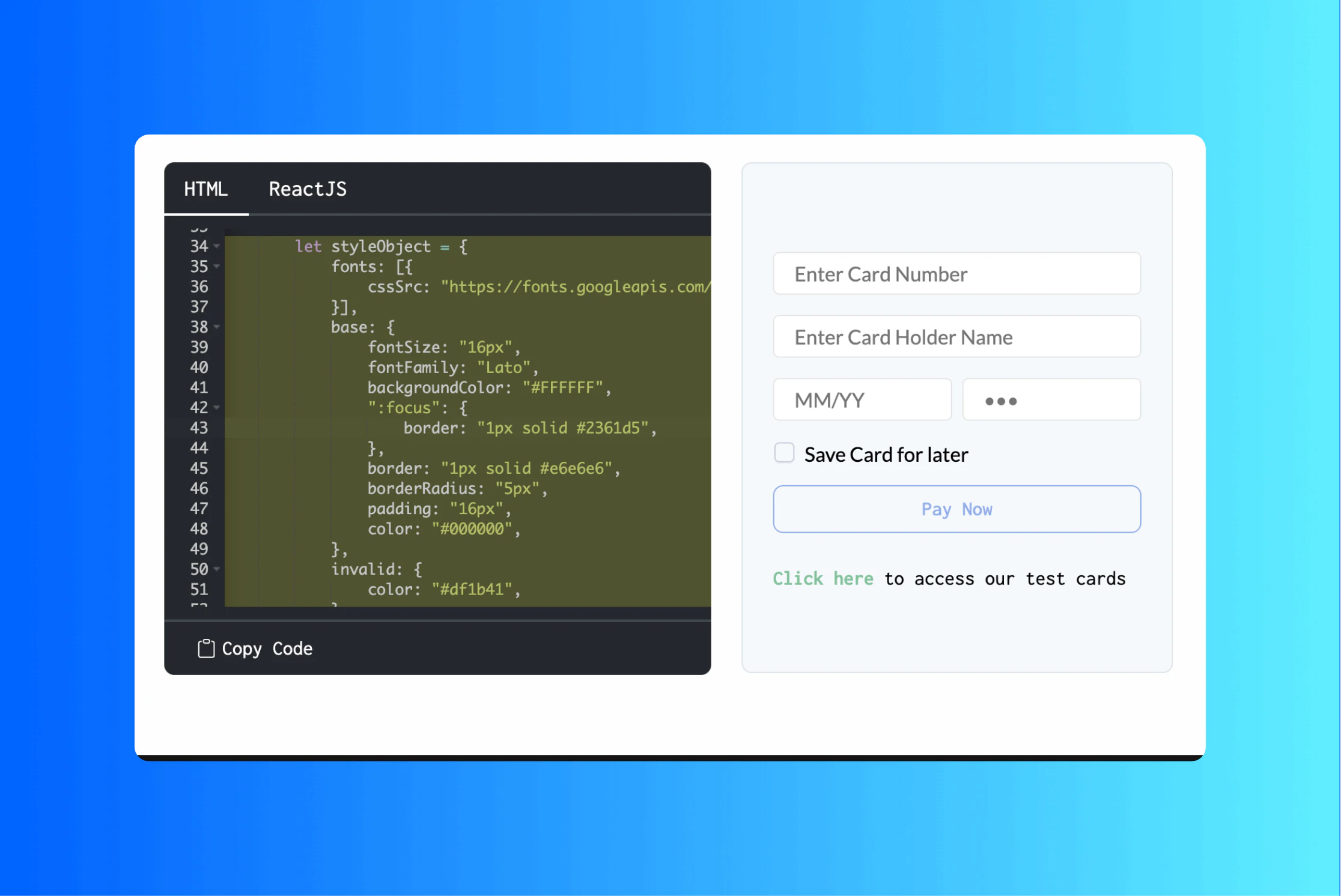
In this step, you need to display the checkout interface to the customer. The UI should include a checkbox, allowing the customer to consent to card storage for future use.
 ### Send card details to Telr
In the [make payment api](/api-reference/payments/latest/payments/pay), you need to set `save_instrument` to `true` after obtaining the customer's consent. Once consent is received, Telr will initiate a token generation request with the card networks. Telr will first process the payment, completing the 2FA (two-factor authentication) step before sending the token generation request. If 2FA is not successfully completed—meaning the payment fails—Telr will not send the token provisioning request to the card networks, and the card will not be tokenized.
```javascript javascript theme={null}
const orderPayRequest = {
"payment_session_id": "session_CLLC8TuxmB48U8pYJy4z8Ktk9Eh6IMnJzAScehfhKRarvab9KCl09YNxLsDjfeU104u4bqcKgk3ckbIsGsAWHBjvlv0XhRlJEzx4E5cLUHRC",
"payment_method": {
"card": {
"channel": "link",
"card_holder_name": "Test",
"card_number": "4111111111111111",
"card_expiry_mm": "12",
"card_expiry_yy": "30",
"card_cvv": "123"
}
},
"save_instrument": true
}
Telr.PGPayOrder("2023-08-01", orderPayRequest).then((response) => {
console.log('Transaction Initiated successfully:', response.data);
})
.catch((error) => {
console.error('Error creating transaction:', error);
});
```
```python python theme={null}
cardPayRequest = PayOrderRequest(
save_instrument=True,
payment_session_id="session_LnO-vcZ9znG_swyugIFmZRtvP3ZC7euzAq4Gq8IfNjt68OFCJ31mbJsN8SWZ169G8y0awciDTv5wSGSgG-EDdG0eQTX1Ra43hdhWE4EtEEIJ",
payment_method=PayOrderRequestPaymentMethod(
CardPaymentMethod(
card=Card(
channel="link",
card_number="4111111111111111",
card_expiry_mm="12",
card_holder_name="Test",
card_cvv="123",
card_expiry_yy="25"
)
)
)
)
try:
api_response = Telr().PGPayOrder(x_api_version="2022-09-01", pay_order_request=cardPayRequest)
print(api_response.data)
except Exception as e:
print(e)
```
```go go theme={null}
channel := "link"
cardNumber := "4111111111111111"
cardHolderName := "Test"
cardMonth := "12"
cardYear := "25"
cardCvv := "123"
version := "2022-09-01"
cardPayRequest := cashfree.PayOrderRequest{
SaveInstrument: true,
PaymentSessionId: "session_LnO-vcZ9znG_swyugIFmZRtvP3ZC7euzAq4Gq8IfNjt68OFCJ31mbJsN8SWZ169G8y0awciDTv5wSGSgG-EDdG0eQTX1Ra43hdhWE4EtEEIJ",
PaymentMethod: cashfree.PayOrderRequestPaymentMethod{
CardPaymentMethod: &cashfree.CardPaymentMethod{
Card: cashfree.Card{
Channel: channel,
CardNumber: &cardNumber,
CardExpiryMm: &cardMonth,
CardHolderName: &cardHolderName,
CardCvv: &cardCvv,
CardExpiryYy: &cardYear,
},
},
},
}
orderPayResponse, httpResponse, err := cashfree.PGPayOrder(&version, &cardPayRequest, nil, nil, nil)
if err != nil {
fmt.Println(err.Error())
} else {
fmt.Println(httpResponse.StatusCode)
fmt.Println(orderPayResponse)
}
```
```php php theme={null}
$card_detail = new \Telr\Model\Card();
$card_detail->setChannel("link");
$card_detail->setCardHolderName("Test");
$card_detail->setCardNumber("4111111111111111");
$card_detail->setCardExpiryMm("12");
$card_detail->setCardExpiryYy("30");
$card_detail->setCardCvv("123");
$payment_method_detail = new \Telr\Model\PayOrderRequestPaymentMethod();
$payment_method_detail->setCard($card_detail);
$pay_order_request = new \Telr\Model\PayOrderRequest();
$pay_order_request->setPaymentSessionId("session_z7NWGEFJ9iW3au9z8AaEwPWhH_sloNFZnDDZ-Sif9J7WeN3WNCAs363gyzoDwMyhlID0VitGkCPjl37Wmzis6UZzLECYWpClQsv7x0lm--Iw");
$pay_order_request->setPaymentMethod($payment_method_detail);
$pay_order_request->setSaveInstrument(True);
try {
$result = $cashfree->PGPayOrder($x_api_version, $pay_order_request, null, null, null);
} catch (Exception $e) {
echo 'Exception when calling PGPayOrder: ', $e->getMessage(), PHP_EOL;
}
```
If the payment is successful the card will be tokenized and stored in Telr's vault
Next learn how to use an exsting stored card for a customer.
# Guide to get and use a saved Card
### Get Saved Cards
You first need to get the saved cards for a customer using the `customer_id`. You can then display these cards to the customer.
```bash Get all cards for a customer theme={null}
curl --location --request GET 'https://sandbox.cashfree.com/pg/customers/customer001/instruments?instrument_type=card' \
--header 'Content-Type: application/json' \
--header 'X-client-id: ' \
--header 'X-client-secret: ' \
--header 'x-api-version: <'
```
```json response theme={null}
[
{
"instrument_id": "0ce6dc4c-b2d6-4adf-8307-22db4712e008",
"instrument_type": "card",
"instrument_uid": "046b6362289c49ce2f984af5bbaa66baa4d9693fdc528904f0486c034f5ac047",
"instrument_display": "XXXXXXXXXXXX5759",
"instrument_meta": {
"card_network": "visa",
"card_bank_name": "KOTAK MAHINDRA BANK",
"card_country": "IN",
"card_type": "debit_card",
"card_token_details": {
"par": "V0010015822212349663819044436",
}
},
"instrument_status": "ACTIVE",
"created_at": "2022-02-22T09:13:06.000+00:00",
"afa_reference": "1343199",
"customer_id": "customer001"
}
]
```
```bash Get a particular card for customer theme={null}
curl --location --request GET 'https://sandbox.cashfree.com/pg/customers/customer001/instruments/b43a75c1-bfda-4781-85a1-67915a19fcb6' \
--header 'Content-Type: application/json' \
--header 'X-client-id: ' \
--header 'X-client-secret: ' \
--header 'x-api-version: <>'
```
```json response theme={null}
{
"instrument_id": "0ce6dc4c-b2d6-4adf-8307-22db4712e008",
"instrument_type": "card",
"instrument_uid": "046b6362289c49ce2f984af5bbaa66baa4d9693fdc528904f0486c034f5ac047",
"instrument_display": "XXXXXXXXXXXX5759",
"instrument_meta": {
"card_network": "visa",
"card_bank_name": "KOTAK MAHINDRA BANK",
"card_country": "IN",
"card_type": "debit_card",
"card_token_details": {
"par": "V0010015822212349663819044436",
}
},
"instrument_status": "ACTIVE",
"created_at": "2022-02-22T09:13:06.000+00:00",
"afa_reference": "1343199",
"customer_id": "customer001"
}
```
### Payment for a saved card
Once you have the `instrument_uid`, you can pass that in the [order pay api](/api-reference/payments/latest/payments/pay) to intiate payment for a specific card.
```bash Payment for saved card request theme={null}
curl --location --request POST 'https://sandbox.cashfree.com/pg/orders/sessions' \
--header 'Content-Type: application/json' \
--header 'x-api-version: 2021-05-21' \
--data-raw '{
"payment_session_id": "session_7NvteR73Fh11P3f3bNdcubIAJgBJJgGK9diC6U5jvr_jfWBS8o-Z2iPf20diqBMVfWDwvARGrISZRCPoDSWjw4Eb1GrKtoZZQT_BWyXW25fD",
"payment_method": {
"card": {
"channel": "link",
"instrument_id": "b43a75c1-bfda-4781-85a1-67915a19fcb6",
"card_cvv": "900"
}
}
}
'
```
```API Response theme={null}
{
"payment_method": "card",
"channel": "link",
"action": "link",
"data": {
"url": "https://sandbox.cashfree.com/pg/view/gateway/BNrBgLWeeFoGjschqa1req_h1omPvM0Yc",
"payload": null,
"content_type": null,
"method": null,
},
"cf_payment_id": 622739106
}
```
### Send card details to Telr
In the [make payment api](/api-reference/payments/latest/payments/pay), you need to set `save_instrument` to `true` after obtaining the customer's consent. Once consent is received, Telr will initiate a token generation request with the card networks. Telr will first process the payment, completing the 2FA (two-factor authentication) step before sending the token generation request. If 2FA is not successfully completed—meaning the payment fails—Telr will not send the token provisioning request to the card networks, and the card will not be tokenized.
```javascript javascript theme={null}
const orderPayRequest = {
"payment_session_id": "session_CLLC8TuxmB48U8pYJy4z8Ktk9Eh6IMnJzAScehfhKRarvab9KCl09YNxLsDjfeU104u4bqcKgk3ckbIsGsAWHBjvlv0XhRlJEzx4E5cLUHRC",
"payment_method": {
"card": {
"channel": "link",
"card_holder_name": "Test",
"card_number": "4111111111111111",
"card_expiry_mm": "12",
"card_expiry_yy": "30",
"card_cvv": "123"
}
},
"save_instrument": true
}
Telr.PGPayOrder("2023-08-01", orderPayRequest).then((response) => {
console.log('Transaction Initiated successfully:', response.data);
})
.catch((error) => {
console.error('Error creating transaction:', error);
});
```
```python python theme={null}
cardPayRequest = PayOrderRequest(
save_instrument=True,
payment_session_id="session_LnO-vcZ9znG_swyugIFmZRtvP3ZC7euzAq4Gq8IfNjt68OFCJ31mbJsN8SWZ169G8y0awciDTv5wSGSgG-EDdG0eQTX1Ra43hdhWE4EtEEIJ",
payment_method=PayOrderRequestPaymentMethod(
CardPaymentMethod(
card=Card(
channel="link",
card_number="4111111111111111",
card_expiry_mm="12",
card_holder_name="Test",
card_cvv="123",
card_expiry_yy="25"
)
)
)
)
try:
api_response = Telr().PGPayOrder(x_api_version="2022-09-01", pay_order_request=cardPayRequest)
print(api_response.data)
except Exception as e:
print(e)
```
```go go theme={null}
channel := "link"
cardNumber := "4111111111111111"
cardHolderName := "Test"
cardMonth := "12"
cardYear := "25"
cardCvv := "123"
version := "2022-09-01"
cardPayRequest := cashfree.PayOrderRequest{
SaveInstrument: true,
PaymentSessionId: "session_LnO-vcZ9znG_swyugIFmZRtvP3ZC7euzAq4Gq8IfNjt68OFCJ31mbJsN8SWZ169G8y0awciDTv5wSGSgG-EDdG0eQTX1Ra43hdhWE4EtEEIJ",
PaymentMethod: cashfree.PayOrderRequestPaymentMethod{
CardPaymentMethod: &cashfree.CardPaymentMethod{
Card: cashfree.Card{
Channel: channel,
CardNumber: &cardNumber,
CardExpiryMm: &cardMonth,
CardHolderName: &cardHolderName,
CardCvv: &cardCvv,
CardExpiryYy: &cardYear,
},
},
},
}
orderPayResponse, httpResponse, err := cashfree.PGPayOrder(&version, &cardPayRequest, nil, nil, nil)
if err != nil {
fmt.Println(err.Error())
} else {
fmt.Println(httpResponse.StatusCode)
fmt.Println(orderPayResponse)
}
```
```php php theme={null}
$card_detail = new \Telr\Model\Card();
$card_detail->setChannel("link");
$card_detail->setCardHolderName("Test");
$card_detail->setCardNumber("4111111111111111");
$card_detail->setCardExpiryMm("12");
$card_detail->setCardExpiryYy("30");
$card_detail->setCardCvv("123");
$payment_method_detail = new \Telr\Model\PayOrderRequestPaymentMethod();
$payment_method_detail->setCard($card_detail);
$pay_order_request = new \Telr\Model\PayOrderRequest();
$pay_order_request->setPaymentSessionId("session_z7NWGEFJ9iW3au9z8AaEwPWhH_sloNFZnDDZ-Sif9J7WeN3WNCAs363gyzoDwMyhlID0VitGkCPjl37Wmzis6UZzLECYWpClQsv7x0lm--Iw");
$pay_order_request->setPaymentMethod($payment_method_detail);
$pay_order_request->setSaveInstrument(True);
try {
$result = $cashfree->PGPayOrder($x_api_version, $pay_order_request, null, null, null);
} catch (Exception $e) {
echo 'Exception when calling PGPayOrder: ', $e->getMessage(), PHP_EOL;
}
```
If the payment is successful the card will be tokenized and stored in Telr's vault
Next learn how to use an exsting stored card for a customer.
# Guide to get and use a saved Card
### Get Saved Cards
You first need to get the saved cards for a customer using the `customer_id`. You can then display these cards to the customer.
```bash Get all cards for a customer theme={null}
curl --location --request GET 'https://sandbox.cashfree.com/pg/customers/customer001/instruments?instrument_type=card' \
--header 'Content-Type: application/json' \
--header 'X-client-id: ' \
--header 'X-client-secret: ' \
--header 'x-api-version: <'
```
```json response theme={null}
[
{
"instrument_id": "0ce6dc4c-b2d6-4adf-8307-22db4712e008",
"instrument_type": "card",
"instrument_uid": "046b6362289c49ce2f984af5bbaa66baa4d9693fdc528904f0486c034f5ac047",
"instrument_display": "XXXXXXXXXXXX5759",
"instrument_meta": {
"card_network": "visa",
"card_bank_name": "KOTAK MAHINDRA BANK",
"card_country": "IN",
"card_type": "debit_card",
"card_token_details": {
"par": "V0010015822212349663819044436",
}
},
"instrument_status": "ACTIVE",
"created_at": "2022-02-22T09:13:06.000+00:00",
"afa_reference": "1343199",
"customer_id": "customer001"
}
]
```
```bash Get a particular card for customer theme={null}
curl --location --request GET 'https://sandbox.cashfree.com/pg/customers/customer001/instruments/b43a75c1-bfda-4781-85a1-67915a19fcb6' \
--header 'Content-Type: application/json' \
--header 'X-client-id: ' \
--header 'X-client-secret: ' \
--header 'x-api-version: <>'
```
```json response theme={null}
{
"instrument_id": "0ce6dc4c-b2d6-4adf-8307-22db4712e008",
"instrument_type": "card",
"instrument_uid": "046b6362289c49ce2f984af5bbaa66baa4d9693fdc528904f0486c034f5ac047",
"instrument_display": "XXXXXXXXXXXX5759",
"instrument_meta": {
"card_network": "visa",
"card_bank_name": "KOTAK MAHINDRA BANK",
"card_country": "IN",
"card_type": "debit_card",
"card_token_details": {
"par": "V0010015822212349663819044436",
}
},
"instrument_status": "ACTIVE",
"created_at": "2022-02-22T09:13:06.000+00:00",
"afa_reference": "1343199",
"customer_id": "customer001"
}
```
### Payment for a saved card
Once you have the `instrument_uid`, you can pass that in the [order pay api](/api-reference/payments/latest/payments/pay) to intiate payment for a specific card.
```bash Payment for saved card request theme={null}
curl --location --request POST 'https://sandbox.cashfree.com/pg/orders/sessions' \
--header 'Content-Type: application/json' \
--header 'x-api-version: 2021-05-21' \
--data-raw '{
"payment_session_id": "session_7NvteR73Fh11P3f3bNdcubIAJgBJJgGK9diC6U5jvr_jfWBS8o-Z2iPf20diqBMVfWDwvARGrISZRCPoDSWjw4Eb1GrKtoZZQT_BWyXW25fD",
"payment_method": {
"card": {
"channel": "link",
"instrument_id": "b43a75c1-bfda-4781-85a1-67915a19fcb6",
"card_cvv": "900"
}
}
}
'
```
```API Response theme={null}
{
"payment_method": "card",
"channel": "link",
"action": "link",
"data": {
"url": "https://sandbox.cashfree.com/pg/view/gateway/BNrBgLWeeFoGjschqa1req_h1omPvM0Yc",
"payload": null,
"content_type": null,
"method": null,
},
"cf_payment_id": 622739106
}
```