> ## Documentation Index
> Fetch the complete documentation index at: https://telr-docs.cashfree.com/llms.txt
> Use this file to discover all available pages before exploring further.
# Pre-Authorization
Pre-authorization (pre-auth) allows merchants to temporarily block funds on a customer’s card and capture the payment later, typically after order fulfillment. This helps secure funds without charging the customer immediately.
Telr Payment Gateway (PG) supports pre-auth for Visa and Mastercard credit and debit cards.
## How pre-authorization works?
With pre-auth, you can :
* Authorize an amount on a customer’s card without immediate capture.
* Capture the authorized amount later (fully or partially) when ready.
* Void the authorization to release funds if the transaction is not completed.
Unlike standard transactions, where funds are instantly captured, pre-auth provides flexibility in payment processing.
## Pre-authorization flow
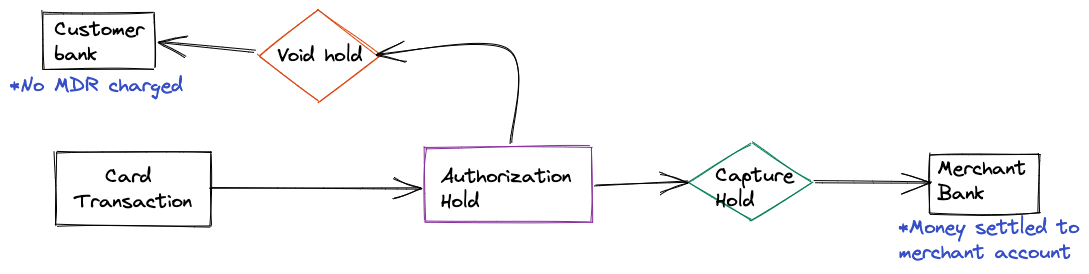
1. The customer initiates the payment.
2. The amount is blocked on the customer’s card after successful payment completion.
3. The merchant can:
* Either Capture the full or partial amount.
**OR**
* Void the authorization to release the blocked funds to the customer.
**Note**: If not captured within seven days, the funds are automatically released.
 ## Pre-authorization feature request
* To enable pre-auth for your account, submit a request via the [Support Form](https://telr.cashfree.com/merchants/landing?env=prod\&raise_issue=1).
## Managing pre-authorization transactions
You can capture or void pre-auth transactions from the Cashfree [Merchant Dashboard](https://telr.cashfree.com/merchants) or integrate the capture and void APIs to automate the process.
**Note**
>
* You must capture or void a pre-auth transaction within seven days of authorization.
* A transaction can only be captured or voided once.
* Once captured, a transaction cannot be voided.
* Once voided, a transaction cannot be captured.
* Transactions not captured within 7 days are automatically released back to the customer.
* Voided transactions return funds to the customer immediately.
* After pre-auth is enabled for your account, ensure all Pre Auth transactions are either captured or voided.
## Supported payment instruments for pre-authorization
Telr Payment Gateway supports pre-auth workflow on cards and UPI (Unified Payments Interface).
### Cards
If you are using cards, you do not need to provide any additional parameters while initiating the payment.
Below is a sample `/orders/pay` request and response:
```json /orders/pay request theme={null}
curl --request POST \
--url https://sandbox.cashfree.com/pg/orders/sessions \
--header 'Content-Type: application/json' \
--header 'x-api-version: ' \
--data '{
"payment_method": {
"card": {
"card_cvv": "900",
"card_display": "3243",
"card_expiry_mm": "03",
"card_expiry_yy": "26",
"card_number": "4111111111111111",
"channel": "link",
"cryptogram": "AQBBBBBBZatIlaIAmWKSghwBBBB=",
"token_requestor_id": "22457512314",
"token_type": "ISSUER_GC_TOKEN"
}
},
"payment_session_id": "session__CvcEmNKDkmERQrxnx39ibhJ3Ii034pjc8ZVxf3qcgEXCWlgDDlHRgz2XYZCqpajDQSXMMtCusPgOIxYP2LZx0-05p39gC2Vgmq1RAj--gcn"
}'
```
```json Response theme={null}
{
"payment_method": "card",
"channel": "link",
"action": "link",
"cf_payment_id": "91235",
"payment_amount": 22.42,
"data": {
"url": "https://sandbox.cashfree.com/pg/view/gateway/FHsuvhayLM5mmhINoqri7ba296e2ebca8b98e6119f6223021a13",
"payload": {
"name": "card"
},
"content_type": "application/x-www-form-urlencoded",
"method": "post"
}
}
```
### UPI
For UPI pre-auth, you need to pass additional parameters in the `/orders/pay` API request. Once you have created the order, invoke the Order Pay API call with the `authorize_only`, `authorization` parameters.
The `authorization` object contains the following attributes:
* `approve_by` - The time by when customer needs to approve this one time mandate request.
* `start_time` - The time when the mandate should start.
* `end_time` - The time until when the mandate hold will be on customer’s bank account. You can call capture and void until this time.
#### UPI Collect
Below is a sample UPI Collect request and response:
```json UPI pre-auth payment request theme={null}
curl --request POST \
--url https://api.cashfree.com/pg/orders/sessions \
--header 'Content-Type: application/json' \
--data '{
"payment_session_id": "HTIdYxfOYgqKyYM3rLCZ",
"payment_method" : {
"upi" : {
"channel": "collect",
"upi_id": "rohit@okicici",
"authorize_only": true,
"authorization" : {
"approve_by": "2022-02-08T19:20:12+05:30",
"start_time": "2022-02-09T12:34:34Z",
"end_time": "2022-02-10T12:34:34Z"
}
}
}
}'
```
```json Response theme={null}
{
"payment_method": "upi",
"channel": "collect",
"action": "custom",
"data": {
"url": null,
"payload": null,
"content_type": null,
"method": null
},
"cf_payment_id": 749079622
}
```
#### UPI Intent
Below is a sample UPI Intent request and response:
```json UPI pre-auth payment request theme={null}
curl --request POST \
--url https://api.cashfree.com/pg/orders/sessions \
--header 'Content-Type: application/json' \
--data '{
"payment_session_id": "HTIdYxfOYgqKyYM3rLCZ",
"payment_method" : {
"upi" : {
"channel": "link",
"authorize_only": true,
"authorization" : {
"approve_by": "2022-02-08T19:20:12+05:30",
"start_time": "2022-02-09T12:34:34Z",
"end_time": "2022-02-10T12:34:34Z"
}
}
}
}'
```
```json Response theme={null}
{
"action": "custom",
"cf_payment_id": 2333615254,
"channel": "link",
"data": {
"url": null,
"payload": {
"bhim": "bhim://upi/mandate?pa=MerchantVPA@Bank&pn=MerchantName&tr=transactionref1234&am=5.00&cu=INR&orgid=400011&mc=4722&purpose=01&tn=Telr%20Payments&validitystart=19122023&validityend=28122023&amrule=MAX&recur=ONETIME&rev=N&share=Y&block=Y&txnType=CREATE&mode=13",
"default": "upi://mandate?pa=MerchantVPA@Bank&pn=MerchantName&tr=transactionref1234&am=5.00&cu=INR&orgid=400011&mc=4722&purpose=01&tn=Telr%20Payments&validitystart=19122023&validityend=28122023&amrule=MAX&recur=ONETIME&rev=N&share=Y&block=Y&txnType=CREATE&mode=13",
"gpay": "tez://upi/mandate?pa=MerchantVPA@Bank&pn=MerchantName&tr=transactionref1234&am=5.00&cu=INR&orgid=400011&mc=4722&purpose=01&tn=Telr%20Payments&validitystart=19122023&validityend=28122023&amrule=MAX&recur=ONETIME&rev=N&share=Y&block=Y&txnType=CREATE&mode=13",
"paytm": "paytmmp://upi/mandate?pa=MerchantVPA@Bank&pn=MerchantName&tr=transactionref1234&am=5.00&cu=INR&orgid=400011&mc=4722&purpose=01&tn=Telr%20Payments&validitystart=19122023&validityend=28122023&amrule=MAX&recur=ONETIME&rev=N&share=Y&block=Y&txnType=CREATE&mode=13",
"phonepe": "phonepe://upi/mandate?pa=MerchantVPA@Bank&pn=MerchantName&tr=transactionref1234&am=5.00&cu=INR&orgid=400011&mc=4722&purpose=01&tn=Telr%20Payments&validitystart=19122023&validityend=28122023&amrule=MAX&recur=ONETIME&rev=N&share=Y&block=Y&txnType=CREATE&mode=13",
"web": "https://api.cashfree.com/pg/view/upi/25hg94m.ZUlx19KgZ48TXh82GrsNamC20vVw0QVK17xLE2BFOo.708f026c-5f7d-4c49-9"
},
"content_type": null,
"method": null
},
"payment_amount": 5,
"payment_method": "upi"
}
```
### Capture
The capture workflow helps you to capture the payment and move the authorised amount partially or completely from customers bank account to your bank account.
```json Capture request theme={null}
curl --request POST \
--url https://api.cashfree.com/pg/orders/:order_id/authorization \
--header 'Content-Type: application/json' \
--header 'x-api-version: <>' \
--header 'x-client-id: <>' \
--header 'x-client-secret: <>' \
--data '{
"action": "CAPTURE",
"amount": "2.00"
}'
```
```json Capture response theme={null}
{
"auth_id": "203924176048",
"authorization": {
"action": "CAPTURE",
"status": "SUCCESS",
"captured_amount": 2.00,
"start_time": "2022-02-09T18:04:34+05:30",
"end_time": "2022-02-10T18:04:34+05:30",
"approve_by": "2022-02-08T19:20:12+05:30"
},
"bank_reference": "203924176048",
"cf_payment_id": 7079622,
"entity": "payment",
"is_captured": false,
"order_amount": 3.00,
"order_id": "order_184824oxmihLPJhERptCzgR08YGOan2",
"payment_amount": 3.00,
"payment_currency": "INR",
"payment_group": "upi",
"payment_message": "PRE_AUTH|Transaction initiated",
"payment_method": {
"upi": {
"channel": "collect",
"upi_id": "rohit@okicici"
}
},
"payment_status": "SUCCESS",
"payment_time": "2022-02-08T14:31:56+05:30"
}
```
### Void
The void workflow helps you to release the entire authorized amount back to the customer.
```json Void request theme={null}
curl --request POST \
--url https://api.cashfree.com/pg/orders/:order_id/authorization \
--header 'Content-Type: application/json' \
--header 'x-api-version: <>' \
--header 'x-client-id: <>' \
--header 'x-client-secret: <>' \
--data '{
"action": "VOID"
}'
```
```json Void response theme={null}
{
"auth_id": null,
"authorization": {
"action": "VOID",
"status": "SUCCESS",
"captured_amount": null,
"start_time": "2022-02-09T18:04:34+05:30",
"end_time": "2022-02-10T18:04:34+05:30",
"approve_by": "2022-02-08T19:20:12+05:30"
},
"bank_reference": "203924193623",
"cf_payment_id": 749235871,
"entity": "payment",
"is_captured": false,
"order_amount": 3.00,
"order_id": "order_184824pANPV12CVRkdxHi3mrPZ9KOcg",
"payment_amount": 3.00,
"payment_currency": "INR",
"payment_group": "upi",
"payment_message": "PRE_AUTH|Transaction initiated",
"payment_method": {
"upi": {
"channel": "collect",
"upi_id": "rsedwardian@okicici"
}
},
"payment_status": "VOID",
"payment_time": "2022-02-08T16:15:23+05:30"
}
```
## FAQs
Capture call is performed after authorization. It is a merchant-initiated request (via API) to collect the previously authorized funds. This step debits the amount from the customer.
If not captured within 7 days, the authorization expires, and the funds are released back to the customer.
Yes, merchants can capture a partial amount of the authorized funds.
MDR is always applied only on the captured amount.
All Visa and Mastercard credit and debit cards support pre-authorization.
A void call cancels the authorization before capture, releasing the hold on funds.
No, voiding must be for the entire authorized amount.
Here are some common use cases:
## Pre-authorization feature request
* To enable pre-auth for your account, submit a request via the [Support Form](https://telr.cashfree.com/merchants/landing?env=prod\&raise_issue=1).
## Managing pre-authorization transactions
You can capture or void pre-auth transactions from the Cashfree [Merchant Dashboard](https://telr.cashfree.com/merchants) or integrate the capture and void APIs to automate the process.
**Note**
>
* You must capture or void a pre-auth transaction within seven days of authorization.
* A transaction can only be captured or voided once.
* Once captured, a transaction cannot be voided.
* Once voided, a transaction cannot be captured.
* Transactions not captured within 7 days are automatically released back to the customer.
* Voided transactions return funds to the customer immediately.
* After pre-auth is enabled for your account, ensure all Pre Auth transactions are either captured or voided.
## Supported payment instruments for pre-authorization
Telr Payment Gateway supports pre-auth workflow on cards and UPI (Unified Payments Interface).
### Cards
If you are using cards, you do not need to provide any additional parameters while initiating the payment.
Below is a sample `/orders/pay` request and response:
```json /orders/pay request theme={null}
curl --request POST \
--url https://sandbox.cashfree.com/pg/orders/sessions \
--header 'Content-Type: application/json' \
--header 'x-api-version: ' \
--data '{
"payment_method": {
"card": {
"card_cvv": "900",
"card_display": "3243",
"card_expiry_mm": "03",
"card_expiry_yy": "26",
"card_number": "4111111111111111",
"channel": "link",
"cryptogram": "AQBBBBBBZatIlaIAmWKSghwBBBB=",
"token_requestor_id": "22457512314",
"token_type": "ISSUER_GC_TOKEN"
}
},
"payment_session_id": "session__CvcEmNKDkmERQrxnx39ibhJ3Ii034pjc8ZVxf3qcgEXCWlgDDlHRgz2XYZCqpajDQSXMMtCusPgOIxYP2LZx0-05p39gC2Vgmq1RAj--gcn"
}'
```
```json Response theme={null}
{
"payment_method": "card",
"channel": "link",
"action": "link",
"cf_payment_id": "91235",
"payment_amount": 22.42,
"data": {
"url": "https://sandbox.cashfree.com/pg/view/gateway/FHsuvhayLM5mmhINoqri7ba296e2ebca8b98e6119f6223021a13",
"payload": {
"name": "card"
},
"content_type": "application/x-www-form-urlencoded",
"method": "post"
}
}
```
### UPI
For UPI pre-auth, you need to pass additional parameters in the `/orders/pay` API request. Once you have created the order, invoke the Order Pay API call with the `authorize_only`, `authorization` parameters.
The `authorization` object contains the following attributes:
* `approve_by` - The time by when customer needs to approve this one time mandate request.
* `start_time` - The time when the mandate should start.
* `end_time` - The time until when the mandate hold will be on customer’s bank account. You can call capture and void until this time.
#### UPI Collect
Below is a sample UPI Collect request and response:
```json UPI pre-auth payment request theme={null}
curl --request POST \
--url https://api.cashfree.com/pg/orders/sessions \
--header 'Content-Type: application/json' \
--data '{
"payment_session_id": "HTIdYxfOYgqKyYM3rLCZ",
"payment_method" : {
"upi" : {
"channel": "collect",
"upi_id": "rohit@okicici",
"authorize_only": true,
"authorization" : {
"approve_by": "2022-02-08T19:20:12+05:30",
"start_time": "2022-02-09T12:34:34Z",
"end_time": "2022-02-10T12:34:34Z"
}
}
}
}'
```
```json Response theme={null}
{
"payment_method": "upi",
"channel": "collect",
"action": "custom",
"data": {
"url": null,
"payload": null,
"content_type": null,
"method": null
},
"cf_payment_id": 749079622
}
```
#### UPI Intent
Below is a sample UPI Intent request and response:
```json UPI pre-auth payment request theme={null}
curl --request POST \
--url https://api.cashfree.com/pg/orders/sessions \
--header 'Content-Type: application/json' \
--data '{
"payment_session_id": "HTIdYxfOYgqKyYM3rLCZ",
"payment_method" : {
"upi" : {
"channel": "link",
"authorize_only": true,
"authorization" : {
"approve_by": "2022-02-08T19:20:12+05:30",
"start_time": "2022-02-09T12:34:34Z",
"end_time": "2022-02-10T12:34:34Z"
}
}
}
}'
```
```json Response theme={null}
{
"action": "custom",
"cf_payment_id": 2333615254,
"channel": "link",
"data": {
"url": null,
"payload": {
"bhim": "bhim://upi/mandate?pa=MerchantVPA@Bank&pn=MerchantName&tr=transactionref1234&am=5.00&cu=INR&orgid=400011&mc=4722&purpose=01&tn=Telr%20Payments&validitystart=19122023&validityend=28122023&amrule=MAX&recur=ONETIME&rev=N&share=Y&block=Y&txnType=CREATE&mode=13",
"default": "upi://mandate?pa=MerchantVPA@Bank&pn=MerchantName&tr=transactionref1234&am=5.00&cu=INR&orgid=400011&mc=4722&purpose=01&tn=Telr%20Payments&validitystart=19122023&validityend=28122023&amrule=MAX&recur=ONETIME&rev=N&share=Y&block=Y&txnType=CREATE&mode=13",
"gpay": "tez://upi/mandate?pa=MerchantVPA@Bank&pn=MerchantName&tr=transactionref1234&am=5.00&cu=INR&orgid=400011&mc=4722&purpose=01&tn=Telr%20Payments&validitystart=19122023&validityend=28122023&amrule=MAX&recur=ONETIME&rev=N&share=Y&block=Y&txnType=CREATE&mode=13",
"paytm": "paytmmp://upi/mandate?pa=MerchantVPA@Bank&pn=MerchantName&tr=transactionref1234&am=5.00&cu=INR&orgid=400011&mc=4722&purpose=01&tn=Telr%20Payments&validitystart=19122023&validityend=28122023&amrule=MAX&recur=ONETIME&rev=N&share=Y&block=Y&txnType=CREATE&mode=13",
"phonepe": "phonepe://upi/mandate?pa=MerchantVPA@Bank&pn=MerchantName&tr=transactionref1234&am=5.00&cu=INR&orgid=400011&mc=4722&purpose=01&tn=Telr%20Payments&validitystart=19122023&validityend=28122023&amrule=MAX&recur=ONETIME&rev=N&share=Y&block=Y&txnType=CREATE&mode=13",
"web": "https://api.cashfree.com/pg/view/upi/25hg94m.ZUlx19KgZ48TXh82GrsNamC20vVw0QVK17xLE2BFOo.708f026c-5f7d-4c49-9"
},
"content_type": null,
"method": null
},
"payment_amount": 5,
"payment_method": "upi"
}
```
### Capture
The capture workflow helps you to capture the payment and move the authorised amount partially or completely from customers bank account to your bank account.
```json Capture request theme={null}
curl --request POST \
--url https://api.cashfree.com/pg/orders/:order_id/authorization \
--header 'Content-Type: application/json' \
--header 'x-api-version: <>' \
--header 'x-client-id: <>' \
--header 'x-client-secret: <>' \
--data '{
"action": "CAPTURE",
"amount": "2.00"
}'
```
```json Capture response theme={null}
{
"auth_id": "203924176048",
"authorization": {
"action": "CAPTURE",
"status": "SUCCESS",
"captured_amount": 2.00,
"start_time": "2022-02-09T18:04:34+05:30",
"end_time": "2022-02-10T18:04:34+05:30",
"approve_by": "2022-02-08T19:20:12+05:30"
},
"bank_reference": "203924176048",
"cf_payment_id": 7079622,
"entity": "payment",
"is_captured": false,
"order_amount": 3.00,
"order_id": "order_184824oxmihLPJhERptCzgR08YGOan2",
"payment_amount": 3.00,
"payment_currency": "INR",
"payment_group": "upi",
"payment_message": "PRE_AUTH|Transaction initiated",
"payment_method": {
"upi": {
"channel": "collect",
"upi_id": "rohit@okicici"
}
},
"payment_status": "SUCCESS",
"payment_time": "2022-02-08T14:31:56+05:30"
}
```
### Void
The void workflow helps you to release the entire authorized amount back to the customer.
```json Void request theme={null}
curl --request POST \
--url https://api.cashfree.com/pg/orders/:order_id/authorization \
--header 'Content-Type: application/json' \
--header 'x-api-version: <>' \
--header 'x-client-id: <>' \
--header 'x-client-secret: <>' \
--data '{
"action": "VOID"
}'
```
```json Void response theme={null}
{
"auth_id": null,
"authorization": {
"action": "VOID",
"status": "SUCCESS",
"captured_amount": null,
"start_time": "2022-02-09T18:04:34+05:30",
"end_time": "2022-02-10T18:04:34+05:30",
"approve_by": "2022-02-08T19:20:12+05:30"
},
"bank_reference": "203924193623",
"cf_payment_id": 749235871,
"entity": "payment",
"is_captured": false,
"order_amount": 3.00,
"order_id": "order_184824pANPV12CVRkdxHi3mrPZ9KOcg",
"payment_amount": 3.00,
"payment_currency": "INR",
"payment_group": "upi",
"payment_message": "PRE_AUTH|Transaction initiated",
"payment_method": {
"upi": {
"channel": "collect",
"upi_id": "rsedwardian@okicici"
}
},
"payment_status": "VOID",
"payment_time": "2022-02-08T16:15:23+05:30"
}
```
## FAQs
Capture call is performed after authorization. It is a merchant-initiated request (via API) to collect the previously authorized funds. This step debits the amount from the customer.
If not captured within 7 days, the authorization expires, and the funds are released back to the customer.
Yes, merchants can capture a partial amount of the authorized funds.
MDR is always applied only on the captured amount.
All Visa and Mastercard credit and debit cards support pre-authorization.
A void call cancels the authorization before capture, releasing the hold on funds.
No, voiding must be for the entire authorized amount.
Here are some common use cases:
- Ticket Bookings – Airlines, concerts, and events often place a hold on a credit card to ensure funds are available before finalizing the booking. This is useful if confirmation is pending or for refundable ticket options.
- Car Rentals – Rental companies use pre-authorization to secure a deposit in case of damages, late returns, or additional charges. The hold is released if no extra fees are incurred.
- Hotel Reservations – Hotels pre-authorize a guest’s credit card at check-in to cover potential incidentals, damages, or unpaid charges, ensuring payment security before checkout.
Yes, pre-authorization (Pre Auth) is feasible on both payment links and payment forms.
Payment Links
How it Works:
- The merchant generates a payment link on a pre-authorization-enabled account.
- The customer clicks the link and enters payment details.
- The payment is authorized (funds are held but not captured immediately).
- The merchant can capture the payment later when needed.
- If the order is canceled, the hold can be released without charging the card.
Payment Forms
How it Works:
- The customer enters payment details in the form.
- The system processes an authorization-only request.
- The merchant can capture the funds later or release the authorization if the transaction is voided.
Settlement occurs when the merchant finalizes a pre-authorized transaction by capturing the funds.
Merchants typically receive funds from pre-authorized transactions as per their normal settlement cycle, i.e., T+x days after a successful capture.
A dispute may result in a chargeback, requiring the merchant to provide proof of authorization and service fulfillment.
Currently, the pre-authorization feature is not supported for American Express and Diners cards due to limitations imposed by the respective card networks. We are actively monitoring any changes in network policies and will update our services accordingly if support becomes available in the future.