> ## Documentation Index
> Fetch the complete documentation index at: https://telr-docs.cashfree.com/llms.txt
> Use this file to discover all available pages before exploring further.
# Authentication using native OTP
> Learn how you can authenticate card payments on your own website or app.
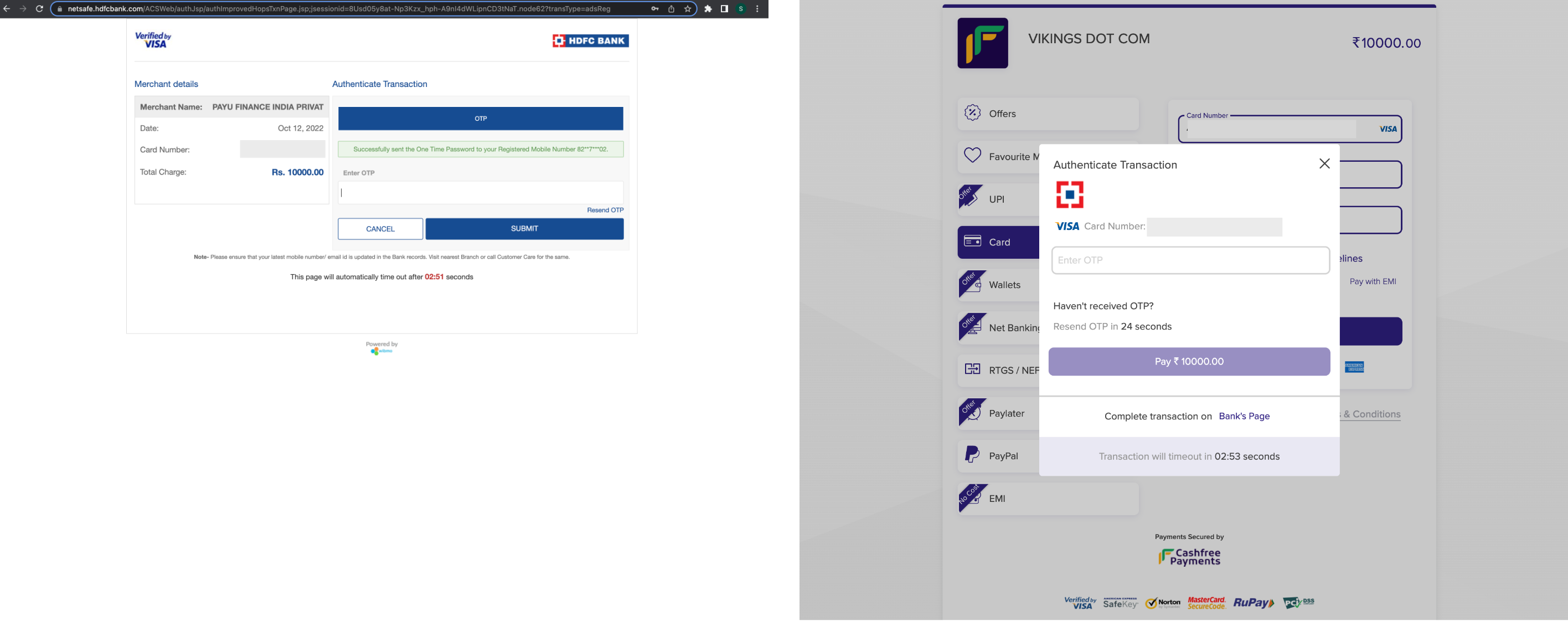
In a conventional card payment journey, customers are redirected to the bank's page to collect the One-Time Password (OTP). With Telr's seamless OTP payments feature, you can enhance the customer experience by collecting the OTP at your own page and submit it to Telr using our Authentication APIs. This eliminates the need for redirecting to the bank's page, reducing payment failures that can happen due to redirection drop-offs or slow internet speeds.
 This feature is only enabled on request. Please fill out the [Support Form](https://telr.cashfree.com/merchants/landing?env=prod\&raise_issue=1) to get this feature enabled for your account.
## Implement Seamless OTP Payments
To implement seamless OTP payments, follow these steps:
```shell native-otp initiate request {9} theme={null}
curl --request POST \
--url https://sandbox.cashfree.com/pg/orders/sessions \
--header 'Content-Type: application/json' \
--header 'x-version: <>' \
--data '{
"payment_session_id": "session_Cke8Y9LKs2CQP9KuTzsomExG1x5CKBLo8MynNCv8QT",
"payment_method":{
"card": {
"channel":"post",
"card_cvv": "123",
"card_holder_name": "rohit",
"card_number":"4706131211212123",
"card_expiry_mm": "03",
"card_expiry_yy": "27"
}
}
}'
```
```json response {2} theme={null}
{
"action": "post",
"cf_payment_id": 14909602643,
"channel": "post",
"data": {
"url": "https://sandbox.cashfree.com/pg/orders/pay/authenticate/14909602643",
"payload": null,
"content_type": "application/json",
"method": "post"
},
"payment_amount": 1.10,
"payment_method": "card"
}
```
You can read more about the API [here](/api-reference/payments/latest/payments/authenticate).
```bash authenticate request {8-9} theme={null}
curl --request POST \
--url https://sandbox.cashfree.com/pg/orders/pay/authenticate/{payment_id} \
--header 'accept: application/json' \
--header 'content-type: application/json' \
--header 'x-api-version: <>' \
--data '
{
"action": "SUBMIT_OTP",
"otp": "111000"
}
'
```
This feature is only enabled on request. Please fill out the [Support Form](https://telr.cashfree.com/merchants/landing?env=prod\&raise_issue=1) to get this feature enabled for your account.
## Implement Seamless OTP Payments
To implement seamless OTP payments, follow these steps:
```shell native-otp initiate request {9} theme={null}
curl --request POST \
--url https://sandbox.cashfree.com/pg/orders/sessions \
--header 'Content-Type: application/json' \
--header 'x-version: <>' \
--data '{
"payment_session_id": "session_Cke8Y9LKs2CQP9KuTzsomExG1x5CKBLo8MynNCv8QT",
"payment_method":{
"card": {
"channel":"post",
"card_cvv": "123",
"card_holder_name": "rohit",
"card_number":"4706131211212123",
"card_expiry_mm": "03",
"card_expiry_yy": "27"
}
}
}'
```
```json response {2} theme={null}
{
"action": "post",
"cf_payment_id": 14909602643,
"channel": "post",
"data": {
"url": "https://sandbox.cashfree.com/pg/orders/pay/authenticate/14909602643",
"payload": null,
"content_type": "application/json",
"method": "post"
},
"payment_amount": 1.10,
"payment_method": "card"
}
```
You can read more about the API [here](/api-reference/payments/latest/payments/authenticate).
```bash authenticate request {8-9} theme={null}
curl --request POST \
--url https://sandbox.cashfree.com/pg/orders/pay/authenticate/{payment_id} \
--header 'accept: application/json' \
--header 'content-type: application/json' \
--header 'x-api-version: <>' \
--data '
{
"action": "SUBMIT_OTP",
"otp": "111000"
}
'
```