> ## Documentation Index
> Fetch the complete documentation index at: https://telr-docs.cashfree.com/llms.txt
> Use this file to discover all available pages before exploring further.
# Webhooks Version V2
> In this article, you will find information on webhook V2 events and the sample payload associated to each event type.
## Webhook essential guides
For seamless integration and security in handling your transactions, refer to the following essential guidelines:
* [Add a webhook](#add-a-webhook)
* [Webhook retries](#webhook-retries)
* [IPs to whitelist](#ips-to-whitelist)
### Add a webhook
Follow the instructions below to configure webhooks for version 2 APIs:
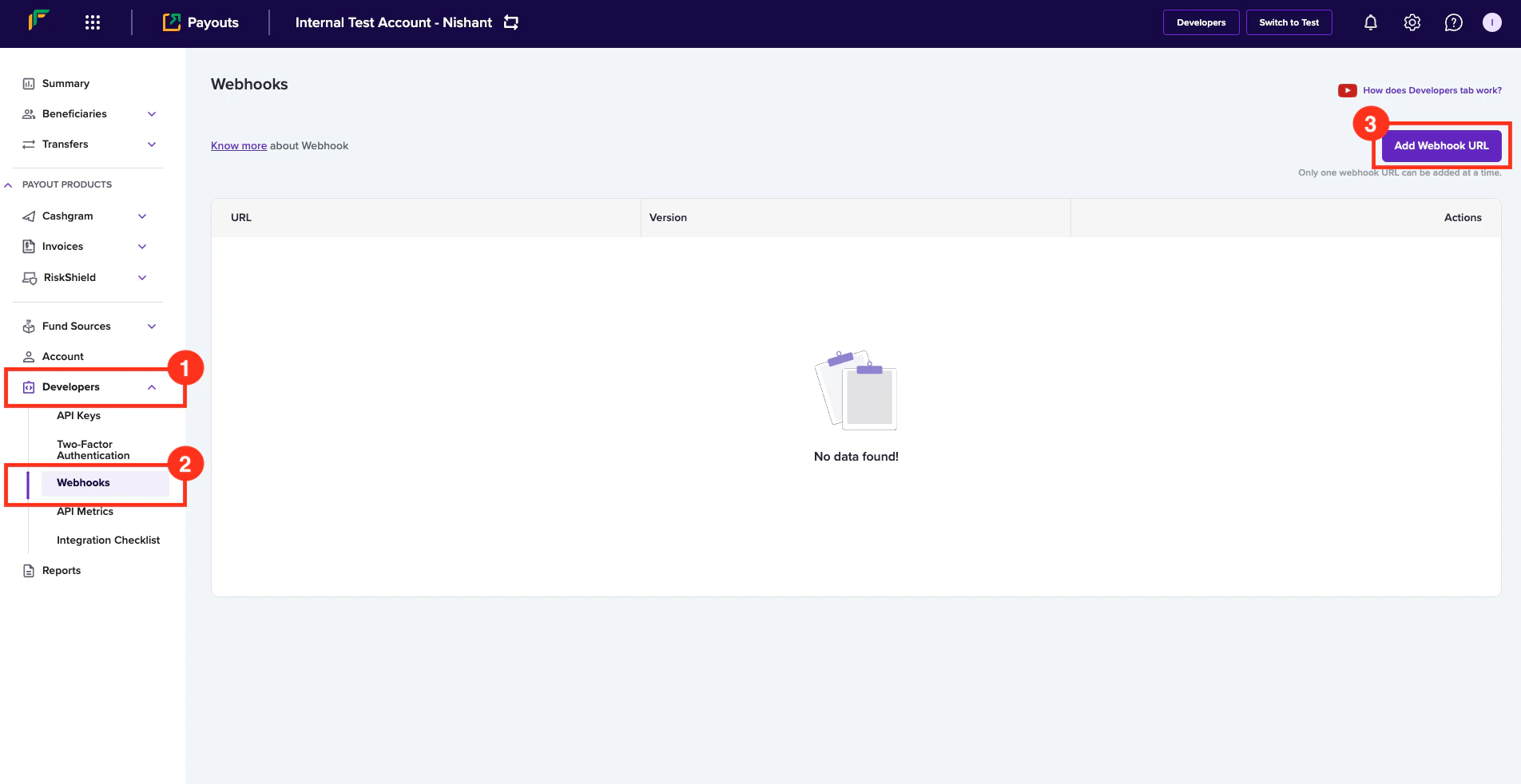
1. Log in to the *Payouts* dashboard using your credentials.
2. Navigate to **Developers** > **Webhooks**.
3. Click **Add Webhook URL** in the *Webhooks* page.
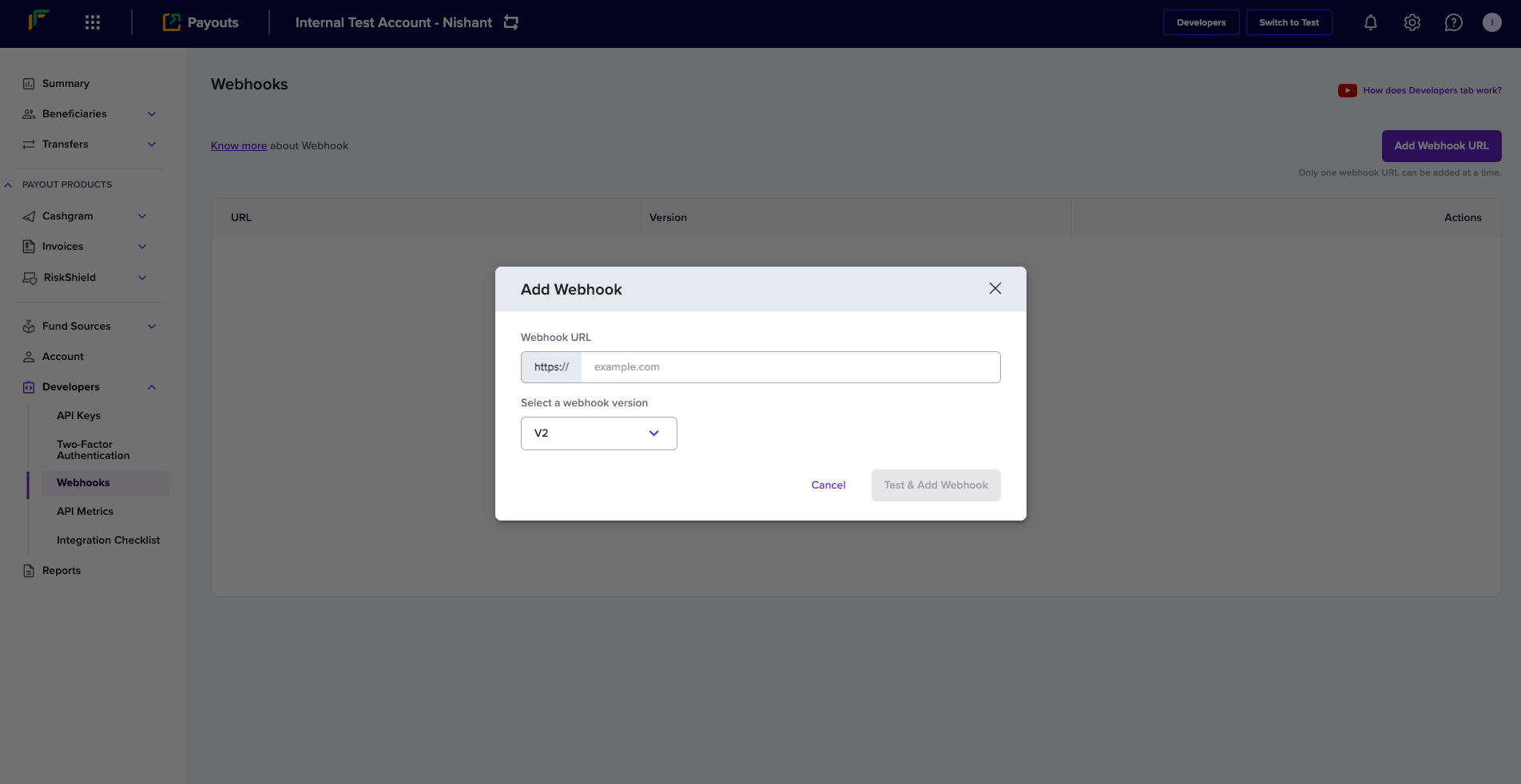
 4. In the *Add Webhook* popup, enter the following information:
* **Webhook URL** - Enter the URL where you want to receive the transfer related notifications.
* **Select a webhook version** - Select **V2** from the dropdown menu.
**Webhook Version: V2**
4. In the *Add Webhook* popup, enter the following information:
* **Webhook URL** - Enter the URL where you want to receive the transfer related notifications.
* **Select a webhook version** - Select **V2** from the dropdown menu.
**Webhook Version: V2**
You will receive V2 webhooks only if you select the option as described and configure the respective URL.
5. Click **Test & Add Webhook**.
 ***
## Webhook signature verification code
These code snippets provide functionality to verify the authenticity of webhook requests and to parse the payload data. It ensures that incoming webhook requests are from a trusted source by checking their signature and then processes the request data.
```go Go theme={null}
type PayoutWebhookEvent struct {
Type string
Raw string
Object interface{}
}
func PayoutVerifyWebhookSignature(signature string, rawBody string, timestamp string) (*PayoutWebhookEvent, error) {
signatureString := timestamp + rawBody
hmacInstance := hmac.New(sha256.New, []byte(*XClientSecret))
hmacInstance.Write([]byte(signatureString))
bytesData := hmacInstance.Sum(nil)
generatedSignature := base64.StdEncoding.EncodeToString(bytesData)
if generatedSignature == signature {
var object interface{}
err := json.Unmarshal([]byte(rawBody), &object)
if err != nil {
return nil, errors.New("something went wrong when unmarshalling raw body")
}
if objectAsMapInterface, ok := object.(map[string]interface{}); ok {
if webhookType, ok := objectAsMapInterface["type"].(string); ok {
return &PayoutWebhookEvent{Type: webhookType, Raw: rawBody, Object: object}, nil
}
}
return &PayoutWebhookEvent{Type: "", Raw: rawBody, Object: object}, nil
}
return nil, errors.New("generated signature and received signature did not match")
}
```
```jsx Node theme={null}
import crypto from "crypto";
class PayoutWebhookEvent {
constructor(type, rawBody, object) {
this.type = type;
this.raw = rawBody;
this.object = object;
}
}
class Telr {
static XClientSecret;
static XApiVersion = "2024-01-01";
/**
* Use this API to verify your webhook signature once you receive from Telr's server.
* @summary Verify Webhook Signatures
* @param {string} signature that is present in the header of the webhook ("x-webhook-signature")
* @param {string} rawBody is the entire body sent to the server in string format
* @param {string} timestamp that is present in the header of the webhook ("x-webhook-timestamp")
* @throws {Error}
*/
static PayoutVerifyWebhookSignature(signature, rawBody, timestamp) {
const body = timestamp + rawBody;
const secretKey = Cashfree.XClientSecret;
let generatedSignature = crypto
.createHmac("sha256", secretKey)
.update(body)
.digest("base64");
if (generatedSignature === signature) {
let jsonObject = JSON.parse(rawBody);
return new PayoutWebhookEvent(jsonObject.type, rawBody, jsonObject);
}
throw new Error(
"Generated signature and received signature did not match."
);
}
}
```
### Components
`PayoutWebhookEvent`
This represents the structure of a webhook event:
| Field | Description |
| :----- | :---------------------------------------- |
| Type | It is the type of the event. |
| Raw | The raw JSON body of the webhook request. |
| Object | The parsed JSON object from the raw body |
`PayoutVerifyWebhookSignature`
This function is used to verify the signature of a webhook request and parse the data. The parameters are as follows:
| Field | Description |
| :-------- | :-------------------------------------------------------------------- |
| signature | The HMAC signature provided in the header information of the webhook. |
| rawBody | The raw JSON body of the request in the string form. |
| timestamp | The timestamp provided in the header information of the webhook. |
`Telr` Class
This class provides the method for verifying webhook signatures:
| Field | Description |
| :------------ | :-------------------------------- |
| XClientSecret | Secret key |
| XAPIVersion | It is the API version: 2024-01-01 |
***
## Webhook signature verification code
These code snippets provide functionality to verify the authenticity of webhook requests and to parse the payload data. It ensures that incoming webhook requests are from a trusted source by checking their signature and then processes the request data.
```go Go theme={null}
type PayoutWebhookEvent struct {
Type string
Raw string
Object interface{}
}
func PayoutVerifyWebhookSignature(signature string, rawBody string, timestamp string) (*PayoutWebhookEvent, error) {
signatureString := timestamp + rawBody
hmacInstance := hmac.New(sha256.New, []byte(*XClientSecret))
hmacInstance.Write([]byte(signatureString))
bytesData := hmacInstance.Sum(nil)
generatedSignature := base64.StdEncoding.EncodeToString(bytesData)
if generatedSignature == signature {
var object interface{}
err := json.Unmarshal([]byte(rawBody), &object)
if err != nil {
return nil, errors.New("something went wrong when unmarshalling raw body")
}
if objectAsMapInterface, ok := object.(map[string]interface{}); ok {
if webhookType, ok := objectAsMapInterface["type"].(string); ok {
return &PayoutWebhookEvent{Type: webhookType, Raw: rawBody, Object: object}, nil
}
}
return &PayoutWebhookEvent{Type: "", Raw: rawBody, Object: object}, nil
}
return nil, errors.New("generated signature and received signature did not match")
}
```
```jsx Node theme={null}
import crypto from "crypto";
class PayoutWebhookEvent {
constructor(type, rawBody, object) {
this.type = type;
this.raw = rawBody;
this.object = object;
}
}
class Telr {
static XClientSecret;
static XApiVersion = "2024-01-01";
/**
* Use this API to verify your webhook signature once you receive from Telr's server.
* @summary Verify Webhook Signatures
* @param {string} signature that is present in the header of the webhook ("x-webhook-signature")
* @param {string} rawBody is the entire body sent to the server in string format
* @param {string} timestamp that is present in the header of the webhook ("x-webhook-timestamp")
* @throws {Error}
*/
static PayoutVerifyWebhookSignature(signature, rawBody, timestamp) {
const body = timestamp + rawBody;
const secretKey = Cashfree.XClientSecret;
let generatedSignature = crypto
.createHmac("sha256", secretKey)
.update(body)
.digest("base64");
if (generatedSignature === signature) {
let jsonObject = JSON.parse(rawBody);
return new PayoutWebhookEvent(jsonObject.type, rawBody, jsonObject);
}
throw new Error(
"Generated signature and received signature did not match."
);
}
}
```
### Components
`PayoutWebhookEvent`
This represents the structure of a webhook event:
| Field | Description |
| :----- | :---------------------------------------- |
| Type | It is the type of the event. |
| Raw | The raw JSON body of the webhook request. |
| Object | The parsed JSON object from the raw body |
`PayoutVerifyWebhookSignature`
This function is used to verify the signature of a webhook request and parse the data. The parameters are as follows:
| Field | Description |
| :-------- | :-------------------------------------------------------------------- |
| signature | The HMAC signature provided in the header information of the webhook. |
| rawBody | The raw JSON body of the request in the string form. |
| timestamp | The timestamp provided in the header information of the webhook. |
`Telr` Class
This class provides the method for verifying webhook signatures:
| Field | Description |
| :------------ | :-------------------------------- |
| XClientSecret | Secret key |
| XAPIVersion | It is the API version: 2024-01-01 |
***
## Webhook events
Payouts webhooks enable you to receive updates about all event-driven activities originating from your account. Below is the list of payouts webhooks:
| Events | Notifications |
| :----------------------- | :-------------------------------------------------------------------------------------------------------------------- |
| TRANSFER\_ACKNOWLEDGED | You will receive this event when the transfer is successful and the amount is debited from the account. |
| TRANSFER\_SUCCESS | You will receive this event when the transferred amount is deposited into the beneficiary bank account. |
| TRANSFER\_FAILED | You will receive this event when the transfer attempt is a failure. |
| TRANSFER\_REVERSED | You will receive this event when the beneficiary bank reversed the transfer request. |
| TRANSFER\_REJECTED | You will receive this event when Telr rejected the transfer request. |
| BULK\_TRANSFER\_REJECTED | You will receive this event when one of the transfers or all the transfers in the batch transfer request is rejected. |
### Sample payload
```json TRANSFER_ACKNOWLEDGED theme={null}
{
"data": {
"transfer_id": "JUNOB2018",
"cf_transfer_id": "123456",
"status": "SUCCESS",
"status_code": "COMPLETED",
"status_description": "The transfer has been initiated via the partner bank successfully. The request is waiting to be processed at the beneficiary bank to do the credit to the end beneficiary.",
"beneficiary_details": {
"beneficiary_id": "JOHN18011",
"beneficiary_instrument_details": {
"bank_account_number": "7766671501729",
"bank_ifsc": "SBIN0000003"
}
},
"transfer_amount": 1,
"transfer_service_charge": 1,
"transfer_service_tax": 0.18,
"transfer_mode": "BANK",
"transfer_utr": "TESTR92023012200543116",
"fundsource_id": "CASHFREE_1",
"added_on": "2021-11-24T13:39:25Z",
"updated_on": "2021-11-24T13:40:27Z"
},
"event_time": "2024-07-25T17:43:37",
"type": "TRANSFER_ACKNOWLEDGED"
}
```
```json TRANSFER_SUCCESS theme={null}
{
"data": {
"transfer_id": "JUNOB2018",
"cf_transfer_id": "123456",
"status": "SUCCESS",
"status_code": "SENT_TO_BENEFICIARY",
"status_description": "The transfer has been initiated via the partner bank successfully, hence your account is debited and the request is successfuly processed by the beneficiary bank and has been credited to the end beneficiary.",
"beneficiary_details": {
"beneficiary_id": "JOHN18011",
"beneficiary_instrument_details": {
"bank_account_number": "7766671501729",
"bank_ifsc": "SBIN0000003"
}
},
"transfer_amount": 1,
"transfer_service_charge": 1,
"transfer_service_tax": 0.18,
"transfer_mode": "BANK",
"transfer_utr": "TESTR92023012200543116",
"fundsource_id": "CASHFREE_1",
"added_on": "2021-11-24T13:39:25Z",
"updated_on": "2021-11-24T13:40:27Z"
},
"event_time": "2024-07-25T17:43:37",
"type": "TRANSFER_SUCCESS"
}
```
```json TRANSFER_FAILED theme={null}
{
"data": {
"transfer_id": "JUNOB2018",
"cf_transfer_id": "123456",
"status": "FAILED",
"status_code": "IMPS_MODE_FAIL",
"status_description": "The transfer has failed because the beneficiary account doesnot support IMPS transfers. This rejection is done by the partner bank for the specific beneficiary account. You can try NEFT or other channels to do the disbursals.",
"beneficiary_details": {
"beneficiary_id": "JOHN18011",
"beneficiary_instrument_details": {
"bank_account_number": "7766671501729",
"bank_ifsc": "SBIN0000003"
}
},
"transfer_amount": 1,
"transfer_service_charge": 1,
"transfer_service_tax": 0.18,
"transfer_mode": "BANK",
"transfer_utr": "TESTR92023012200543116",
"fundsource_id": "CASHFREE_1",
"added_on": "2021-11-24T13:39:25Z",
"updated_on": "2021-11-24T13:40:27Z"
},
"event_time": "2024-07-25T17:43:37",
"type": "TRANSFER_FAILED"
}
```
```json TRANSFER_REVERSED theme={null}
{
"data": {
"transfer_id": "JUNOB2018",
"cf_transfer_id": "123456",
"status": "REVERSED",
"status_code": "INVALID_ACCOUNT_FAIL",
"status_description": "The transfer has been reversed by the beneficiary bank because the Account Number of the beneficiary is invalid. After correcting the account number, you can reinitiate the transfer via Telr so that the transfer can be reattempted again by Telr with the partner bank(s).",
"beneficiary_details": {
"beneficiary_id": "JOHN18011",
"beneficiary_instrument_details": {
"bank_account_number": "7766671501729",
"bank_ifsc": "SBIN0000003"
}
},
"transfer_amount": 1,
"transfer_mode": "BANK",
"fundsource_id": "CASHFREE_1",
"added_on": "2021-11-24T13:39:25Z",
"updated_on": "2021-11-24T13:40:27Z"
},
"event_time": "2024-07-25T17:43:37",
"type": "TRANSFER_REVERSED"
}
```
```json TRANSFER_REJECTED theme={null}
{
"data": {
"transfer_id": "JUNOB2018",
"cf_transfer_id": "123456",
"status": "REJECTED",
"status_code": "INVALID_MODE_FOR_PYID",
"status_description": "The transfer has been rejected because the fundsource does not support this mode of transfer. You should get this mode activated on the fundsource by contacting Telr, and then initiate a new transfer request.",
"beneficiary_details": {
"beneficiary_id": "JOHN18011"
},
"transfer_amount": 1,
"transfer_mode": "BANK",
"fundsource_id": "CASHFREE_1",
"added_on": "2021-11-24T13:39:25Z",
"updated_on": "2021-11-24T13:40:27Z"
},
"event_time": "2024-07-25T17:43:37",
"type": "TRANSFER_REJECTED"
}
```
```json BULK_TRANSFER_REJECTED theme={null}
{
"data": {
"batch_transfer_id": "test_batch_transfer_id",
"cf_batch_transfer_id": "123456",
"status": "REJECTED"
},
"event_time": "2024-07-25T17:43:37",
"type": "BULK_TRANSFER_REJECTED"
}
```
### Parameters
Find the parameters and their description for the events TRANSFER\_SUCCESS, TRANSFER\_FAILED, TRANSFER\_REVERSED, and TRANSFER\_REJECTED below:
| Parameter | description |
| :------------------------------- | :---------------------------------------------------------------------- |
| transfer\_id | It displays the unique ID you created to identify the transfer request. |
| cf\_transfer\_id | It displays the unique ID created by Telr for reference purpose. |
| status | It displays the status of the transfer. |
| status\_code | It displays the specific status of the transfer. |
| status\_description | It displays the detailed explanation of the transfer status. |
| beneficiary\_details | It contains information about the beneficiary. |
| beneficiary\_id | It displays the unique ID to identify the beneficiary. |
| beneficiary\_instrument\_details | It contains the account information of the beneficiary. |
| bank\_account\_number | It displays the bank account number of the beneficiary. |
| bank\_ifsc | It displays the IFSC information of the bank. |
| transfer\_amount | It displays the transfer amount. |
| transfer\_service\_charge | It displays the service charge applied for the transfer amount. |
| transfer\_service\_tax | It displays the taxable amount for the service charge. |
| transfer\_mode | It displays the transfer mode. |
| transfer\_utr | It displays the unique transaction reference number. |
| fundsource\_id | It displays the unique ID to identify the fund source. |
| added\_on | It displays the date and time of the addition. |
| updated\_on | It displays the date and time of the updation. |
| event\_time | It displays the date and time of the webhook event initiation. |
| type | It displays the event type. |
Find the parameters and their description for the event BULK\_TRANSFER\_REJECTED below:
| Parameter | Description |
| :---------------------- | :---------------------------------------------------------------------------- |
| batch\_transfer\_id | It displays the unique ID you created to identify the batch transfer request. |
| cf\_batch\_transfer\_id | It displays the unique ID created by Telr for reference purpose. |
| status | It displays the status of the batch transfer request. |
| event\_time | It displays the date and time of the webhook event initiation. |
| type | It displays the event type. |
***
### Webhook retries
Telr webhooks service does its best to deliver events to your webhook endpoint. It is best practice for your application to respond to the callback. Our webhook service may send many payloads to a single endpoint in quick succession. You will need to build an application and configure your server to receive the response we send when events get triggered during the payout process.
Your server should return a 200 HTTP status code to acknowledge that you received the webhook without any issues. Any other information you return in the request headers or request body gets ignored. Any response code outside the 200 range, including 3xx codes, indicates that you did not receive the webhook.
When Telr does not get the acknowledgement due to any reason, we retry to establish the communication at regular intervals. If we do not receive the response after few attempts, we gradually decrease the rate of retries. Based on this count, the service is disabled if it fails more than five times.
If do not receive notifications from Cashfree Payments as expected, please fill out the [Support Form](https://telr.cashfree.com/merchants/landing?env=prod\&raise_issue=1).
***
### IPs to whitelist
When you decide to consume the webhooks, first, you need to verify if your systems need an IP whitelisting to be done at your end or not. Accordingly you can whitelist the below IPs of Telr:
| UAT |
| :------------ |
| 52.66.25.127 |
| 15.206.45.168 |
| Prod |
| :------------ |
| 52.66.101.190 |
| 3.109.102.144 |
| 3.111.60.173 |
| 18.60.134.245 |
| 18.60.183.142 |
| Port |
| :------------ |
| 443 (secured) |
***
## FAQs
1. **Can I subscribe to webhooks V2 if I use Payout APIs as V1 and V1.2?**\
Yes, you can subscribe to Webhooks V2 even if you're currently using Payout APIs v1 and v1.2.
2. **Can I utilise webhooks V1 while using Payouts APIs V2?**\
Yes, you can typically subscribe to Webhooks V1 even if you're using Payout APIs V2.
3. **Are the webhook events CREDIT\_CONFIRMATION, BENEFICIARY\_INCIDENT, and LOW\_BALANCE\_ALERT, previously available in webhooks V1, still supported and deliverable in Webhooks V2?**\
Yes, you can continue to receive the CREDIT\_CONFIRMATION, BENEFICIARY\_INCIDENT, and LOW\_BALANCE\_ALERT webhook events even after subscribing to Webhooks V2.